
ZOOM Cloud Meetings
Download ApkZOOM Cloud Meetings Application Screenshots


ZOOM Cloud Meetings AI Editor's Review
ZOOM Cloud Meetings is a leading video conferencing platform for online meetings, collaboration, and communication. It offers high-quality video and audio, screen sharing, and meeting recording capabilities, making it ideal for both personal and professional use. Stay connected with colleagues and friends seamlessly.
Comprehensive Analysis
Zoom Cloud Meetings is a robust platform designed for seamless online communication. It facilitates video conferencing, screen sharing, and collaborative meetings effectively. The app offers features like virtual backgrounds, breakout rooms, and meeting recording. While the user interface is generally intuitive, some users may find advanced settings complex. Performance is typically reliable, though occasional bandwidth issues can arise depending on network conditions. Overall, Zoom is a valuable tool for remote collaboration and communication.
Key Advantages
- High-quality video and audio conferencing
- Easy screen sharing and collaboration features
- Cross-platform compatibility (Android, iOS, Windows, Mac)
Areas for Improvement
- Potential security vulnerabilities if not properly configured
- Can consume significant bandwidth during meetings
The description of ZOOM Cloud Meetings
Site Editorial Commentary:AI-native meetings, chat, phone, docs — all in one app
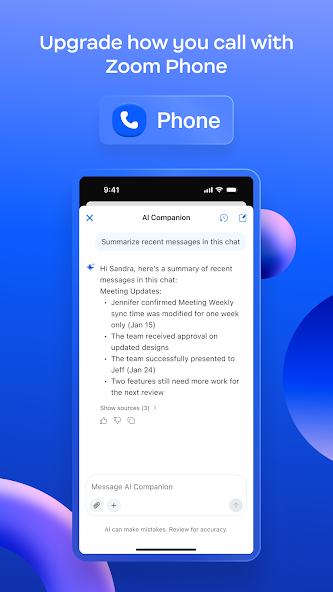
Transform your teamwork experience with Zoom Workplace, an innovative AI-first, and open collaboration platform. This unified suite integrates team chat, meetings, phone capabilities, whiteboard, calendar, mail, documents, and more, streamlining your workflow. Zoom Workplace for Android is compatible with both free and paid Zoom licenses. Enhance your productivity with the AI Companion, available with your Pro or Business Zoom license, seamlessly integrated throughout Zoom Workplace. Quickly catch up on unread messages with summaries and key points, generate draft content, and maintain focused, impactful conversations. This personal assistant is available across Zoom Workplace at no extra cost with your paid Zoom license, accessible from your mobile device. BOOST PRODUCTIVITY ON THE GO WITH AI COMPANION* ON YOUR MOBILE DEVICE Quickly prepare for upcoming meetings with AI-powered insights. Generate initial drafts of content with AI Companion. Receive summaries of unread Team Chat messages for efficient communication. STREAMLINE COMMUNICATIONS WITH A SINGLE APP Schedule or join video meetings instantly with a single tap. Engage in real-time chat with colleagues and external contacts. Make and receive phone calls or send SMS text messages* directly from the app. ENHANCE PRODUCTIVITY Organize and share information efficiently with Zoom Docs. Receive automated meeting summaries powered by AI Companion*. Collaborate and brainstorm effectively on virtual whiteboards. SEAMLESSLY TRANSITION BETWEEN LOCATIONS Move live meetings or calls effortlessly between devices with a single tap. Initiate Zoom Rooms meetings and share content seamlessly*. Multitask efficiently on your Android phone with Picture in Picture or tablet with Split Screen. WORK SECURELY ON THE GO Utilize "Hey Google" Voice Access commands for hands-free control. Ensure data security with enterprise-grade security measures and SSO*. *Certain product features may require a paid Zoom Workplace subscription or other license. Upgrade your free account today to unlock these benefits. AI Companion may not be available in all regions and industry verticals. Some features are not currently available across all regions or plans and are subject to change. UPGRADE TO ZOOM WORKPLACE PRO AND RECEIVE AI COMPANION Host unlimited meetings, each lasting up to 30 hours. Record meetings to the cloud with up to 10GB of storage. Assign meeting co-hosts and schedulers for enhanced collaboration. Your Zoom Workplace Pro subscription will automatically renew unless canceled at least 24 hours before the end of the free trial or the plan billing period. Manage your subscription easily through the Google Play app after activation. The amount charged to your Google Play account payment method will vary based on your selected plan and country. The plan price will be clearly displayed before you begin your free trial or confirm your purchase. We value your feedback! Join the Zoom community: https://community.zoom.com/ Stay connected with us on social media @zoom Terms of Service: https://explore.zoom.us/terms/ Privacy Statement: https://explore.zoom.us/privacy/ For questions or assistance, contact us at https://support.zoom.com/hcWhat's New
Bug fixes and improvements


