
Microsoft Outlook
Download ApkMicrosoft Outlook Application Screenshots


Microsoft Outlook AI Editor's Review
Microsoft Outlook for Android streamlines email, calendar, and contacts into one organized app. Enjoy a focused inbox, seamless scheduling, and easy access to important files. Stay connected and productive on the go with this powerful mobile solution from Microsoft.
Comprehensive Analysis
Microsoft Outlook on Android offers a comprehensive solution for managing your digital life. It combines email, calendar, and contacts into a single, user-friendly interface. The Focused Inbox intelligently filters important emails, reducing clutter and improving productivity. Scheduling meetings and managing contacts is also seamless. While it offers robust features, the app can be resource-intensive and may experience occasional synchronization issues. Overall, Outlook provides a powerful and convenient experience for staying connected on the go.
Key Advantages
- Unified inbox for multiple email accounts
- Integrated calendar and contacts management
- Focused Inbox prioritizes important emails
Areas for Improvement
- Can be resource-intensive on older devices
- Occasional synchronization delays
The description of Microsoft Outlook
Site Editorial Commentary:Stay on top of multiple accounts with emails, calendars & contacts in one place
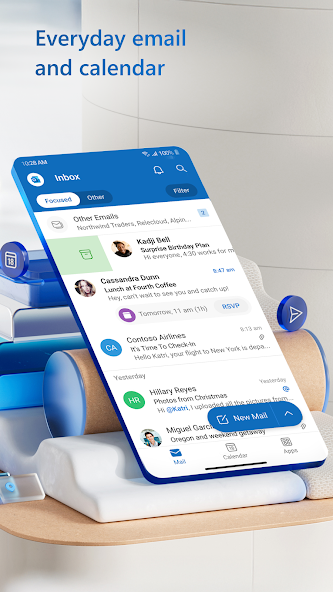
Microsoft Outlook is your central hub for connecting and coordinating your busy life. This secure email and calendar application empowers you to efficiently manage emails, files, and calendars, all within a unified interface. Whether for work, School, or personal use, stay productive and organized with every message that lands in your inbox. The intelligent email organization system filters your mail into 'Focused' and 'Other' categories, ensuring you prioritize important messages effectively. View multiple calendars simultaneously to keep your day on track. Outlook is available free for personal use and offers seamless connectivity to various accounts, including Microsoft Exchange, Microsoft 365, Outlook.com, Gmail, Yahoo Mail, iCloud, and Imap, providing the flexibility to stay connected wherever you are. Craft polished, professional-quality emails using built-in intelligent editing tools that offer real-time typing suggestions and grammar and spelling assistance. Effortlessly send documents, photos, or videos from your Files list, OneDrive, or your device's gallery. Conveniently open Word, Excel, and PowerPoint documents directly from your inbox. Reduce daily distractions and eliminate clutter using swipe gestures to quickly delete, archive, snooze, or move emails to folders. Flag important messages for follow-up or pin them to the top of your inbox. Stay informed about new emails with the 'Play My Emails' feature, and quickly find what you need using voice or text search. Benefit from enterprise-grade security features that protect you from phishing and spam. Seamlessly connect with Teams, Skype, Zoom, and other video calling providers for meetings on the go. If it’s important, manage it with Microsoft Outlook. Microsoft Outlook Includes: Inbox for Everything All in One Place - Email, Contacts & Files • Inbox access to everything you need, including other email providers. Manage your Gmail, Yahoo Mail, and iCloud inbox and calendars for free with Outlook • Files are accessible right from your inbox, with connected Experiences to Microsoft 365, Word, Excel, PowerPoint & Onenote. Access recent attachments from within Outlook, or attach links from OneDrive or other cloud storage • Email organizer equipped with filters, folders & more. Easily filter out unwanted spam email Planning & Calendar Management • See your various calendars side by side to help you schedule your day • Create and join your online video calls from Teams, Zoom, and Skype • RSVP to invites from your inbox & send personalized comments • Keep your weekly calendar and daily tasks organized with Outlook Task Organizer & Productivity Solutions - Intelligence Everywhere • Group same subject emails & conversations for easier tracking • Use your voice to find people, contacts, emails, events & attachments with Search • Use suggested replies to respond quickly • Listen to emails with Play My Emails & catch up hands-free • Calendar automatically updates with travel & delivery information Security & Privacy - Protect your mailbox with enterprise-grade security • Microsoft Outlook protects your files, emails and information with security you can trust • Secure email app with built-in protection against viruses, phishing & spam email • Encrypt emails to prevent forwarding when sending sensitive information (requires Microsoft 365 subscription) The Microsoft Outlook mobile app is compatible with: • Microsoft Exchange • Microsoft 365 • Outlook.com, Hotmail.com, MSN.com, Live.com • Gmail • Yahoo Mail • iCloud • IMAP, POP3 To see your emails and events at a glance, get the Outlook companion app - including a complication and tile - for Wear OS. Consumer Health Data Privacy Policy: https://go.microsoft.com/fwlink/?linkid=2259814What's New
Copilot helps you prepare for your meeting in minutes by summarizing key documents, tasks, and past meetings.


