
Advanced Download Manager
APK 다운로드Advanced Download Manager 앱 스크린샷



Advanced Download Manager AI 편집자의 리뷰
Advanced Download Manager is a robust Android app for efficiently managing and accelerating downloads of various file types. It boasts multi-threading support, advanced scheduling, and customizable settings, making it a top choice for power users.
종합 분석
Advanced Download Manager (ADM) is a powerful tool for Android users who frequently download files. It supports multi-threading, allowing for significantly faster download speeds compared to standard download managers. ADM offers advanced features such as download scheduling, queue management, and customizable settings for various file types. While the interface might seem complex initially, the extensive functionalities and performance improvements make it a worthwhile choice. The free version includes ads, which can sometimes be disruptive.
주요 장점
- Multi-threaded downloading for increased speed
- Comprehensive download management features
- Customizable settings and scheduling options
개선 영역
- The interface can feel overwhelming for new users
- Ad support can be intrusive in the free version
설명 Advanced Download Manager
Site Editorial Commentary:ADM intercepts files from browsers and accelerates downloading by several times.
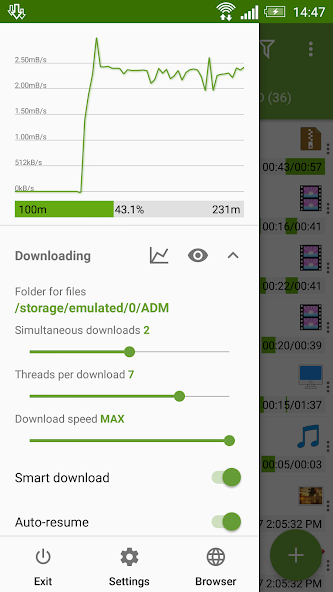
Advanced Download Manager (ADM) is a powerful and versatile download tool designed to enhance your Android downloading experience. This application stands out with its ability to download up to five files simultaneously, leveraging multi-threading technology (up to 16 parts) to significantly accelerate download speeds. ADM intelligently intercepts links from Android browsers and your clipboard, making it seamless to start downloads directly from your web browsing or copied links. Key features include background downloading with auto-resume after failures, ensuring that your downloads continue uninterrupted. It supports a wide range of file types, including images, documents, archives, and programs, and allows downloading directly to your SD card on devices running Lollipop and Marshmallow. ADM boasts a smart algorithm that optimizes download speed, particularly beneficial for users on 2G, 3G, and 4G networks. You can also adjust the maximum download speed in real-time to suit your needs. The app doubles as a video and music downloader, catering to your media downloading requirements. The integrated torrent downloader supports adding torrents and magnet links from various sources, including the editor, clipboard, browser, and file explorer. It offers comprehensive torrent management features, such as file selection, size and type display, name-based searching, and sorting. The right menu provides filtering options for torrents and seeding, while the settings section offers extensive customization. ADM's advanced settings allow for interface customization, theme selection, and custom download folders. You can configure automatic actions post-download, save different file types to specific folders, and even create empty files to potentially accelerate downloads. Battery-saving features include automatic process termination when the battery level is low. The app supports importing link lists from text files and offers auto-resume after errors or connection breaks. A download scheduler allows you to plan start times, and a turbo mode further boosts download speeds. Features like file size retrieval and automatic filename generation enhance user convenience. The clean and intuitive interface features a light material design, filtering by type and status, quick access options in the left menu, and a context menu for easy management. Downloads can be sorted by order, size, and name, and completed files can be opened through your preferred apps. Real-time download information, such as speed, size, and time, is readily available. The app supports pausing, resuming, and restarting downloads and allows for advanced site profile creation. Extended notifications provide real-time updates via an icon with progress and speed in the notification panel and a transparent progress bar on top of all windows. Completion notifications are customizable with sound and vibration. The built-in ADM Browser supports multiple tabs, advanced media downloading, history, and bookmarks. It simplifies sending files to the downloader and functions as a download accelerator for social networking. The "User-Agent" option allows you to mask your browser for specific websites. ADM offers simple, intuitive controls: tap a download to start/stop, tap a completed download to open the file, and long-press to access the context menu. Adding URLs is straightforward, with options to select ADM Editor from the "Complete action using" window, share links via the "Share" or "Send" options, or copy links for automatic interception. Overall, Advanced Download Manager is a robust and feature-rich download manager suitable for users seeking enhanced control and speed in their Android downloading activities.


