
UpKeep
Download ApkUpKeep Application Screenshots


UpKeep AI Editor's Review
UpKeep is a mobile-first maintenance management platform designed to streamline workflows for maintenance teams. It offers features like work order management, preventive maintenance scheduling, asset management, and reporting. UpKeep aims to improve efficiency and reduce downtime, helping businesses optimize their maintenance operations.
Comprehensive Analysis
UpKeep is a maintenance management software that helps teams efficiently manage work orders, track assets, and schedule preventive maintenance. The mobile app allows technicians to access information and update tasks from the field. It offers features like barcode scanning, reporting, and integrations with other business systems. While UpKeep can significantly improve maintenance operations, some users may find the pricing challenging. The user experience is generally positive, with a focus on ease of use and accessibility. Performance can be inconsistent at times.
Key Advantages
- User-friendly interface for easy navigation and quick adoption.
- Comprehensive features covering work orders, asset tracking, and preventive maintenance.
- Mobile accessibility allows technicians to manage tasks on the go.
Areas for Improvement
- Can be expensive for small businesses with limited budgets.
- Some users have reported occasional glitches or slow performance.
The description of UpKeep
Site Editorial Commentary:Work Order & Task Manager for Facility, Asset & Property Management Teams, CMMS
Transform your maintenance operations from stressful to successful with UpKeep, the premier CMMS (Computerized Maintenance Management System) solution tailored for manufacturing and facility managers. UpKeep streamlines maintenance and enhances team communication through real-time status updates. This modern, intuitive, and customizable platform is designed to simplify your work life, evidenced by over 100,000 app downloads, 200,000+ users, and millions of work orders created.Thousands of maintenance and facility managers are transitioning from cumbersome pen-and-paper systems, spreadsheets, and outdated desktop software to UpKeep's intuitive mobile app, eliminating frustration and boosting efficiency.
UpKeep empowers your technicians with team progress updates and seamless communication, all accessible at their fingertips.
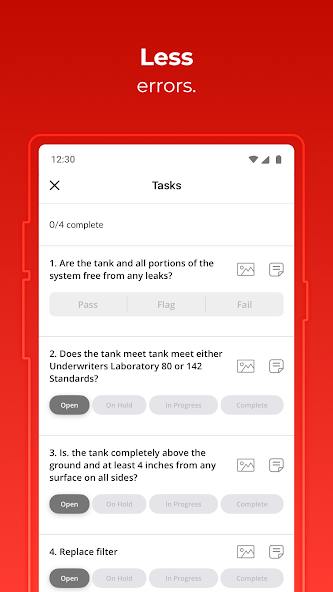
Capture equipment issues instantly by taking a photo, annotating it, attaching a repair checklist, and assigning it to a technician. Monitor the progress of all assigned work orders in one centralized location.
With UpKeep’s mobile app, critical information is readily available whenever and wherever you need it.
Rated as the #1 Maintenance Management Software by Capterra & Gartner, UpKeep offers a free version that includes unlimited work orders.
KEY FEATURES:
INSTANTLY UPDATE & ASSIGN WORK ORDERS ON THE MOVE
Reduce labor costs significantly by minimizing time spent searching for information. Achieve the following and more:
· Easily submit work requests and prioritize them.
· Capture photos of damaged equipment and assign them to technicians.
· Utilize the new home screen to view overdue, high-priority, and bookmarked work orders.
· Add due dates, assignees, details, locations, and files to work orders.
· Scan asset barcodes with your camera to link them to work orders.
· Schedule recurring work orders based on time intervals.
· ExeCute preventive and reactive maintenance tasks efficiently.
· Customize or hide specific work order fields.
· Set up time-based meter readings for critical inspections.
· Comment on work orders to answer questions or request status updates from anywhere.
TRACK AND ORGANIZE YOUR MAINTENANCE HISTORY
Maximize the lifespan of your equipment and minimize unplanned downtime expenses. Experience the following benefits and more:
· View and organize work orders by due date, update history, status, priority, location, and other criteria.
· Search for assets by name or barcode.
· Set asset statuses to monitor unplanned downtime.
· Review all previous work orders completed for each asset.
· Track time spent on individual work orders.
· Identify all parts and costs associated with work orders across assets.
· Attach manuals and repair instructions to assets.
· Instantly access warranty information to determine repair or replacement options.
ENHANCE TEAM COMMUNICATION IN ONE PLACE
Reduce phone calls and interruptions by managing streamlined requests efficiently. Improve focus where and when it matters most:
· Communicate with your team on work order progress through updates.
· Receive real-time status updates on open and in-progress work orders.
· Configure email and push notifications to stay informed about work orders and team progress.
UPKEEP MOBILE + WEB WORK TOGETHER
Enjoy a seamless desktop and mobile experience that your team can rely on anywhere:
· Changes made in the UpKeep app are reflected on your desktop interface.
· Service equipment even without Wi-Fi or cell service.
· Take work orders Offline and sync updates when back online.
FREE SIGN-UP AND UNLIMITED WORK ORDERS
Accessible maintenance software for everyone:
· Create unlimited work orders at no cost.
· Upgrade to UpKeep Starter, Professional, or Business Plus for advanced features and expanded team member access.
--
Try UpKeep now and begin with unlimited free work orders today.
Your use of this app is subject to the UpKeep Terms of Service, which can be found at http://www.onupkeep.com/tos.php
What's New
- Work Order filters and sorting have a new look to help streamline your workflow and create a more intuitive experience.
- Technicians and Limited Technicians can now restock any part, regardless of if they created it.
- Phone numbers are now linked in Work Order descriptions for quick and easy calls.
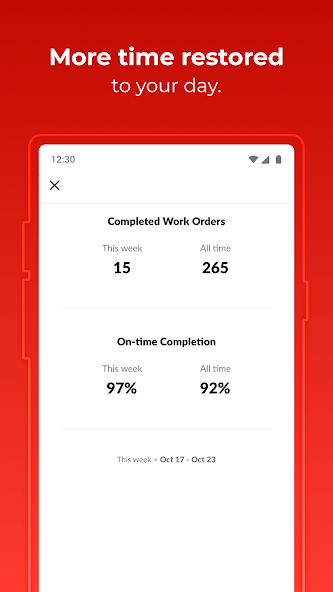
- On-Time Completion in the My Impact section on the home screen is now calculated for all time, not per week.


