
Pencil Sketch
Tải xuống APKPencil Sketch Ảnh chụp màn hình ứng dụng


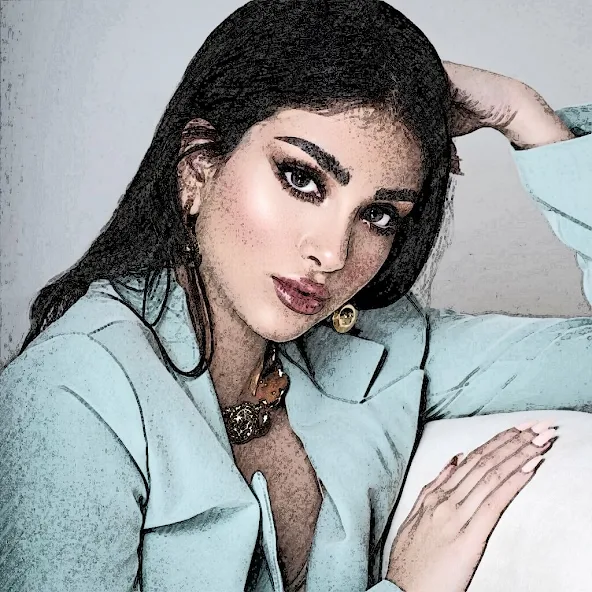

Pencil Sketch AI Đánh giá của biên tập viên
Transform your photos into stunning pencil sketches with Pencil Sketch! This user-friendly app offers various sketch effects, easy editing tools, and quick sharing options. Create unique artistic masterpieces from your photos in seconds. Perfect for creative expression and social media.
Phân tích toàn diện
Pencil Sketch is a simple yet effective photo editing application that specializes in converting photos into pencil sketch-style images. The app features a range of sketch effects, allowing users to easily transform their pictures with just a few taps. The interface is intuitive, making it accessible to users of all skill levels. While it lacks advanced editing tools found in more comprehensive photo editors, Pencil Sketch excels at its core function: creating beautiful and artistic pencil sketch effects. The sharing options are convenient, enabling users to quickly showcase their creations on social media platforms. The app's performance is generally smooth, though users may encounter occasional ads.
Ưu điểm chính
- Easy-to-use interface for quick photo editing
- Variety of pencil sketch effects to choose from
- Fast processing and sharing capabilities
Khu vực cần cải thiện
- Limited advanced editing features
- May contain ads
Mô tả của Pencil Sketch
Site Editorial Commentary:Become an artist by creating pencil sketches and cartoon photos!
Pencil Sketch is an accessible and user-friendly photo editor that empowers you to transform ordinary photos into stunning pencil sketches, effectively turning you into an artist with just a few taps!Effortlessly convert images by selecting them from your gallery or capturing new ones directly through your camera. With a single click, you can generate both classic black and white sketches and vibrant color photo sketches.
Pencil Sketch offers four distinct artistic styles: "Pencil", "Sketch", "Doodle", and "Comic". The "Pencil" style creates refined pencil sketches characterized by smooth edges and graceful curves, making it an ideal choice for those who appreciate the aesthetic of handmade drawings and paintings. The "Sketch" style produces photo sketches with remarkable contour accuracy. The "Doodle" option artfully converts photos into playful doodle-style cartoons, working exceptionally well with portrait photos taken with your selfie camera; sharing these on social media is sure to attract attention. Finally, the "Comic" style is versatile and suitable for nearly any type of photo, generating comic-book-style images with a simple, engaging aesthetic.
Beyond its sketching capabilities, Pencil Sketch functions as a powerful all-in-one photo editor and versatile drawing tool. It provides an exceptional means to transform your photos into captivating works of art and express your unique creativity to the world.
Key photo editor features include:
- One-tap auto enhance for quick image improvements
- A wide array of gorgeous photo effects, filters, and frames to add artistic flair
- Fun stickers to personalize your creations
- Precise adjustments for exposure, contrast, color temperature, and saturation
- Photo sharpness control for crisp, detailed images
- Drawing and text addition tools for personalized annotations
Unleash your inner artist by creating your own doodle pictures on a dedicated canvas. A full suite of colors, pencil styles, and erasers are readily available on the doodle board.
Saving your photo sketches is simplified with a single tap of a button. Sharing your edited photos is equally seamless. Effortlessly share your sketch and cartoon photos on platforms like Facebook, Twitter, E-mail, and via messaging apps.
All photo editing tools are available for Offline use, eliminating the need for a network connection to unleash your creativity with this app.
Please note: All images created using this app will be saved to a dedicated folder named "Pencil_Sketch" on your device.
Có gì mới
Support android 16 and update built-in photo editor


