
Arduino Bluetooth Controller
APK 다운로드Arduino Bluetooth Controller 앱 스크린샷


Arduino Bluetooth Controller AI 편집자의 리뷰
Control your Arduino projects wirelessly with Arduino Bluetooth Controller! This app simplifies remote operation, offering customizable interfaces and seamless connectivity for hobbyists and professionals alike. Perfect for robotics, home automation, and DIY electronics.
종합 분석
The Arduino Bluetooth Controller app provides a convenient way to remotely manage Arduino projects via Bluetooth. Users can easily establish a connection and create custom control interfaces for various applications, such as robotics and home automation. The app's simplicity makes it accessible to beginners, while its customization options cater to more experienced users. The app enhances the flexibility of Arduino projects by enabling wireless operation. However, users should note the necessity of a Bluetooth module on their Arduino board.
주요 장점
- Easy to connect and configure with Arduino boards
- Customizable interface for creating personalized control panels
- Provides wireless control, enhancing project flexibility
개선 영역
- Requires Bluetooth module on the Arduino side
- Limited advanced features compared to dedicated IDEs
설명 Arduino Bluetooth Controller
Site Editorial Commentary:Control any micro-controller that uses a Bluetooth module with your smartphone
Are you an Arduino enthusiast looking to remotely control your projects using your Android phone but lack the time, patience, or expertise to develop a custom Bluetooth conTroller? Then the ARDUINO BLUETOOTH CONTROLLER is the perfect solution for you!This Android application establishes a seamless connection with any Arduino or microcontroller project equipped with a Bluetooth module. A key feature is the ability for users to specify their own Bluetooth module's UUID, ensuring compatibility with a wide range of projects. The default UUID is pre-configured for the popular HC-06 Wireless Serial 4 Pin Bluetooth RF Transceiver Module RS232. (note: When using the default UUID for initial pairing, the password is '1234').
The application offers 4 versatile Command Modes:
1. Vehicle Mode: Activate this mode and use the on-screen "joystick" to control a vehicle with intuitive gestures. The app utilizes your device's built-in accelerometer to translate gestures into commands, offering 8 distinct directional controls: FRONT, BACK, LEFT, RIGHT, FRONT_LEFT, FRONT_RIGHT, BACK_LEFT, BACK_RIGHT.
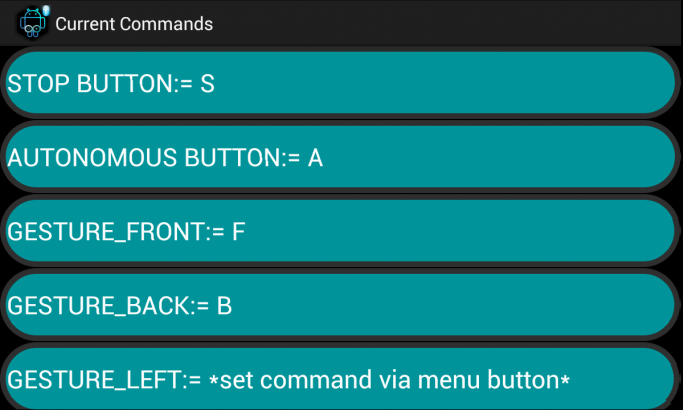
Customize these gestures with your own commands via the "Set Commands" menu. Additionally, dedicated STOP and ANDROID buttons can also be assigned custom functions.
***IMPORTANT*** This mode includes options to adjust the accelerometer axis orientation (X->Y, Y->X) to ensure proper operation across different Android phone orientations.
Furthermore, a sensitivity adjustment allows you to fine-tune the gesture recognition threshold. As the name implies, this mode is specifically tailored for remotely controlling Vehicles incorporating a Bluetooth module and a microcontroller.
2. Fader Mode: This mode provides a fader-seekbar interface, enabling you to send commands ranging from 0-9. Ideal for experimenting with servos, LEDs, motors, and more.
3. Controller Mode: Enjoy a standard controller layout with 10 customizable buttons. The arrow buttons are designed to send commands continuously while pressed, simulating the behavior of a traditional gamepad.
4. Terminal Mode: This mode offers a terminal-like interface for typing and sending individual or sequential commands. The application intelligently divides strings into individual characters and transmits them one-by-one to the Arduino, accommodating the Arduino's serial port byte-by-byte reception. Note that spaces and empty strings are automatically skipped.
All application settings and commands are permanently stored, allowing for easy access and modification to suit your specific project needs.
##################################################################################################
Arduino Side Code
Below is a sample Arduino code snippet demonstrating how to listen for commands received from this Android application:
char incomingByte; // variable to receive data from the serial port
void setup() {
Serial.begin(9600); // start serial communication at 9600bps
}
void loop() {
if( Serial.available() > 0 ) // if data is available to read
{
incomingByte = Serial.read(); // read it and store it in 'incomingByte'
}
}
____________________________________
© 'Arduino' is a trademark of the Arduino team
____________________________________


