
EazyType Marathi Keyboard Emoji & Stickers Gifs
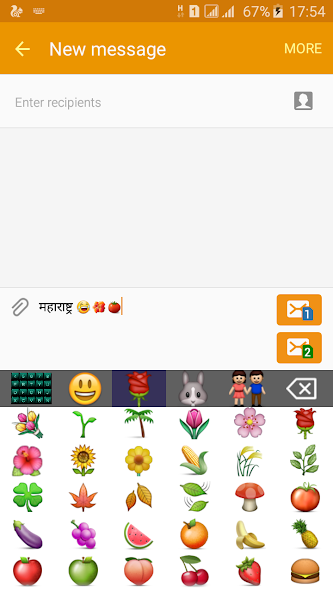
APKをダウンロードEazyType Marathi Keyboard Emoji & Stickers Gifs アプリのスクリーンショット


EazyType Marathi Keyboard Emoji & Stickers Gifs AI 編集者のレビュー
EazyType Marathi Keyboard offers an easy way to type in Marathi with emojis, stickers, and GIFs. It aims to provide a fast and convenient typing experience for Marathi speakers, enhancing communication through rich visual content.
包括的な分析
EazyType Marathi Keyboard is designed to facilitate seamless Marathi typing. The keyboard includes a wide array of emojis, stickers, and GIFs, enhancing user expression. The interface is intuitive, making it easy for users to adapt quickly. While the keyboard performs well on modern devices, older devices might experience some lag. Regular updates to the sticker and GIF library are necessary to keep the content fresh and relevant. Overall, it's a useful tool for Marathi speakers seeking a richer typing experience.
主な利点
- Easy and fast Marathi typing
- Extensive collection of emojis, stickers, and GIFs
- User-friendly interface
改善点
- Potential for keyboard lag on older devices
- Sticker and GIF library may require frequent updates
説明 EazyType Marathi Keyboard Emoji & Stickers Gifs
Site Editorial Commentary:Quick Keyboard Marathi input with English and Emoji Keyboard. easy type
EazyType Marathi keyboard is a user-friendly Android keyboard designed for effortless Marathi typing. Type quickly and easily on your Android phone using EazyType.Express yourself with a wide range of smileys, emojis, stickers, and GIFs perfect for WhatsApp, SMS, and Facebook. EazyType has evolved into Quick Keyboard, offering enhanced features and performance.
This soft keyboard allows you to type Marathi seamlessly in any application, including Gmail, Facebook, and WhatsApp. You can even write blogs in Marathi directly in your web browser. Functioning as your default Android keyboard on phones and tablets, it eliminates the need to learn a specific Marathi keyboard layout. Simply type in English, and with a press of the spacebar, your English word will be automatically converted into Marathi script.
Benefit from intelligent word suggestions that accelerate your typing speed. The keyboard also includes an English typing option; easily switch between English and Marathi by toggling the language button.
If you can read "नमस्ते" (Marathi text) on your mobile phone, you are ready to install this application.
To see a demonstration of how it works, please watch the video.
Installation:
1. Download and install the application on your phone.
2. Open the EazyType home screen. You will find two buttons: (i) Enable Keyboard (ii) Choose default.
3. Tap the 'Enable Keyboard' button and select EazyType Keyboard to activate it.
4. Press the 'Choose default' button and set EazyType Keyboard as your default keyboard.
OR
2. Go to 'Setting' -> 'Language and Input' and check the box for EazyType Marathi.
3. Navigate to any text field where you want to type.
4. Drag down the notification bar (at the top of your phone screen) and tap on 'Select input method'.
5. Choose 'EazyType Marathi' from the popup menu.
OR
Long press on the text field and select 'Input Method'.
Now, choose EazyType Marathi from the popup menu.


