
Real Time Internet Speed Meter
APKをダウンロードReal Time Internet Speed Meter アプリのスクリーンショット
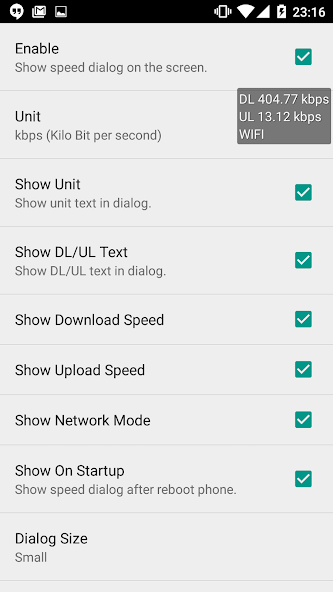


Real Time Internet Speed Meter AI 編集者のレビュー
Real Time Internet Speed Meter is a simple app for monitoring your internet speed. It displays real-time upload and download speeds in the status bar and notification. Keep track of your data usage and network performance efficiently. Easy to use and configure.
包括的な分析
Real Time Internet Speed Meter is a useful tool for monitoring your internet connection's performance. It displays real-time upload and download speeds directly in your status bar and notification area, allowing you to keep a constant eye on your network activity. The app also provides detailed daily data usage statistics, helping you manage your data consumption. While the app is easy to use, the ads could be less intrusive. Overall, it's a handy utility for anyone concerned about their internet speed and data usage.
主な利点
- Real-time speed monitoring in status bar
- Detailed daily data usage statistics
- Customizable preferences and themes
改善点
- May consume battery if refresh rate is too high
- Ads can be intrusive
説明 Real Time Internet Speed Meter
Site Editorial Commentary:See current internet data speed anywhere on screen. Update meter every second.
Enhance your Android experience with the "Real Time Internet Speed Meter", a powerful and unobtrusive tool that provides real-time monitoring of your internet connection speed directly on your screen. This app displays your current download and upload speeds in a small, customizable dialog box, allowing you to monitor your network performance while using other apps, browsing the web, downloading files, playing online games, or uploading content.Key Features:
- Real-time display: Monitor download and upload speeds, along with your current network type, updated every second.
- Always-on display: The speed meter stays visible, even when you switch between apps or return to your home screen.
- Network type support: Compatible with a wide range of network types, including Wi-Fi, HSPA, HSPA+, EDGE, GPRS, LTE, HSUPA, HSDPA, and CDMA.
- Customizable units: Choose your preferred unit type, including Kilobits per second (kbps) or Kilobytes per second (kB/s).
- Extensive customization: Personalize the appearance of the speed meter with options to adjust text size, text color, background color, and display upload/download speeds.
- Automatic start: The speed meter automatically restarts after your phone reboots.
- Easy access to settings: Long-press the dialog box to quickly access the app's settings.
- Battery-friendly design: Designed to minimize battery consumption, ensuring minimal impact on your device's performance.
新着情報
version 1.2.1
- fix crash if no permission for android 6.0+
version 1.2.0
- double click or long click at dialog to open app settings
- add option to disable notification icon on status bar.
- add mB/s , Mbps unit
version 1.1.1
- long click to open app settings.
version 1.1.0
- set application to highest priority to prevent app died


