
Transit Tracker
Télécharger l'APKTransit Tracker Captures d'écran de l'application


Transit Tracker AI Avis de l'éditeur
Transit Tracker provides real-time bus and train locations, arrival predictions, and route planning. A user-friendly interface and comprehensive transit data make commuting easier. Get up-to-the-minute information for a stress-free journey.
Analyse complète
Transit Tracker is a valuable tool for commuters, offering real-time tracking of buses and trains, along with estimated arrival times. The app features a straightforward interface, allowing users to quickly find their routes and stops. The route planning functionality is helpful for navigating unfamiliar areas. While the app generally provides reliable information, occasional data discrepancies may occur. Overall, Transit Tracker enhances the commuting experience by providing timely and accessible transit information.
Principaux avantages
- Accurate real-time transit information
- User-friendly interface and intuitive navigation
- Comprehensive coverage of various transit systems
Domaines d'amélioration
- May experience occasional data inaccuracies
- Relies on data provided by transit agencies, which could be delayed
La description de Transit Tracker
Site Editorial Commentary:Route schedules, maps, and real-time tracking of UTA buses and trains.
Transit Tracker is not affiliated with any transit or government agency; this is not an official UTA app. All data is obtained through public APIs provided by UTA. Details can be found here: https://developer.rideuta.comTransit Tracker - Utah empowers riders to effortlessly utilize the Utah Transit Authority's (UTA) real-time vehicle monitoring and convenient stop finding services.
With Transit Tracker - Utah, you can download route schedules directly to your device for Offline access, ensuring you're always prepared for your journey.
Stay informed with Transit Tracker - Utah's customizable alerts for UTA routes and stops; receive timely notifications when a vehicle on a specific route is approaching or arriving at your designated stop. Never miss your bus or train again!
Please send me an email if you find a problem or if you have any comments or suggestions.
TRACKING
UTA's buses and trains report their locations every 15 seconds (Flex routes are not included).
TRAX and Frontrunner route numbers:
Blue line - 701
Red line - 703
Green line - 704
FrontRunner - 750
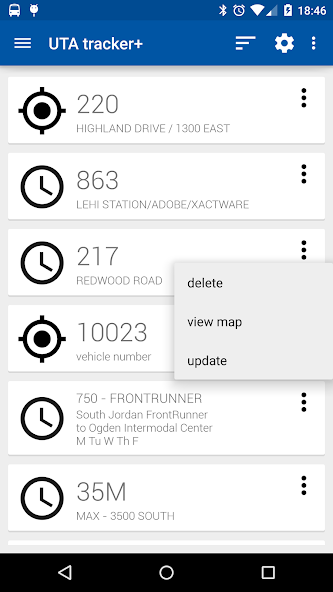
- Enter a route number to view all Vehicles currently operating on that route, input a stop number to see all buses serving that stop, or enter an individual vehicle number (printed inside and on the back of UTA buses) for precise tracking.
ROUTE SCHEDULES
- Request a route schedule for any UTA route by simply entering its number. Schedules can be viewed as clear origin/destination tables or visualized on an interactive map. On the map, tap on a stop to instantly see when the next bus/train is scheduled to arrive. Access all times for that stop by tapping on the info window that appears.
CLOSE STOPS
- Easily locate nearby UTA stops by selecting your current location or entering an address or selecting a point on a map as your search location. Customize your search by specifying a maximum number of stops to return and an optional route filter.
ALERTS
- Define personalized alerts to be notified when a UTA vehicle is approaching or arriving at a specific stop. These alerts are intelligently based on the vehicle's distance from the stop, utilizing the route shape data provided by UTA for accurate predictions.
- Please note that because these alerts rely on the vehicle following the route shape defined by UTA, your alert may not trigger as expected if the vehicle is on detour or isn't following the defined route for any other reason.
Other features:
- Personalize your experience with a choice of light or dark themes.
- Enhance your map view with optional satellite imagery and/or color-coded traffic data.
- Prevent screen dimming and shut-off by optionally keeping the map screen active.
- Fine-tune the update interval of UTA vehicle locations to suit your preferences.
- Select a custom ringtone for alerts to easily distinguish them.
Read more about UTA's monitoring API here:
http://developer.rideuta.com/DataInstructions.aspx
Nouveautés


