AirDroid
APK herunterladenAirDroid Anwendungsbilder


AirDroid AI Redakteursbewertung
AirDroid simplifies mobile device management, offering remote access, file transfer, screen mirroring, and notification management. It's a comprehensive solution for controlling your Android device from a computer, boosting productivity and convenience.
Umfassende Analyse
AirDroid provides a suite of tools for managing your Android device from a computer. Key features include file transfer, remote access, screen mirroring, and notification management. The interface is generally intuitive, making it easy to transfer files and manage notifications. However, remote access features raise some security considerations, and a subscription is needed to unlock the full potential of the application. Overall, AirDroid offers a useful set of features for Android device management.
Hauptvorteile
- Seamless file transfer between devices
- Remote access and control of Android devices
- Convenient screen mirroring functionality
Verbesserungsbereiche
- Potential security concerns with remote access
- Subscription required for full feature access
Die Beschreibung von AirDroid
Site Editorial Commentary:A one-stop solution for everything
AirDroid is a comprehensive mobile device management suite refined over 10 years, offering seamless file transfer, screen mirroring, remote control, and SMS notification management directly from your computer - all consolidated within a single AirDroid app.Major features:
1. Hyper-Fast File Transferring without Limitations
Experience incredibly fast file transfer speeds up to 20MB/s with AirDroid, whether on local or remote connections. Enjoy uncompromised productivity across Wi-Fi, 4G, or 5G networks. The Nearby feature allows instant, direct sharing of photos and videos with nearby friends, even without an account or internet connection.
2. All-in-One File Management
Manage photos, videos, music, apps, storage, and more on your devices from the desktop or web client (web.airdroid.com). Automatically sync and upload photos and videos to your PC, freeing up device storage and preventing potential privacy leaks.
3. Seamless Screen Mirroring
Wirelessly mirror your Android devices to your PC, ideal for sharing your screen with students or partners. Stream your broadcasts via AirDroid to efficiently share games or presentations with your audience.
Screen mirroring doesn't require devices to be on the same network, offering a practical solution for various scenarios.
4. Effortless Remote Control of Android Devices
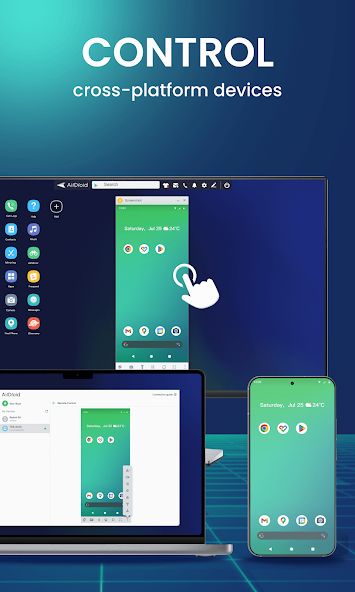
Gain full control of your Android devices without rooting. Simply connect to the AirDroid PC client for quick setup and remotely perform any desired action – play games, open apps, or check phone status.
AirDroid's remote control is easy to configure and operates smoothly, even when devices are geographically distant.
*To remotely control an Android device from another Android device, download AirMirror on the conTroller device.
5. Advanced Remote Monitoring
Transform unused Android phones into surveillance devices using the remote camera feature. Monitor surroundings or listen to environmental sounds with One-Way Audio, eliminating the need for constant screen monitoring.
Monitor newborns, pets, or secure your home without investing in new cameras.
6. Unified Notifications & SMS Management
Stay focused by managing your phone directly from your computer. AirDroid allows you to receive and send texts, connect headsets, input or copy phone numbers, and make calls directly from your computer. Sync app notifications (WhatsApp, Line, Facebook Messenger, etc.) to your computer and reply directly from your desktop, ensuring important messages are always up-to-date.
7. Convenient PC Calls
Import phone numbers in bulk directly on the AirDroid desktop client, initiate calls with a click, and communicate via the phone's handset or Bluetooth headset. AirDroid streamlines the process, prevents manual entry errors, and enhances efficiency.
FAQs:
Q: Do I need to register an account to use AirDroid?
A: An AirDroid account unlocks all features under both local and remote connections. Without registration, you can use AirDroid with limited features on the same Wi-Fi network.
Q: Is AirDroid free to use?
A: AirDroid is free within the local area network. For non-local networks, the free account has a 200MB/month data limit and lacks remote camera access. Upgrade to premium for unlimited remote data and full access to all functions and services.
Was ist neu
1. Bug fixes and finetunes that improve stability and user experience.


