
Shopping List
APK herunterladenShopping List Anwendungsbilder



Shopping List AI Redakteursbewertung
Shopping List simplifies grocery shopping with its intuitive interface. Create, organize, and share lists effortlessly. Never forget an item again, saving time and money. A must-have for efficient shopping!
Umfassende Analyse
Shopping List offers a straightforward solution for managing your grocery needs. Users can easily create lists, add items, and organize them by category. The sharing feature allows for seamless collaboration with family or roommates. While the app excels in basic list management, it could benefit from added functionalities such as price comparison tools and more visual customization options. Overall, it provides a user-friendly experience for creating and managing shopping lists, but might feel limited to users seeking more advanced features.
Hauptvorteile
- Easy to use interface for quick list creation
- List sharing functionality simplifies collaborative shopping
- Helps prevent forgotten items and reduces impulse buys
Verbesserungsbereiche
- Lacks advanced features like price comparison
- Limited customization options for list appearance
Die Beschreibung von Shopping List
Site Editorial Commentary:Shopping List is a handy tool to keep track of your grocery shopping needs.
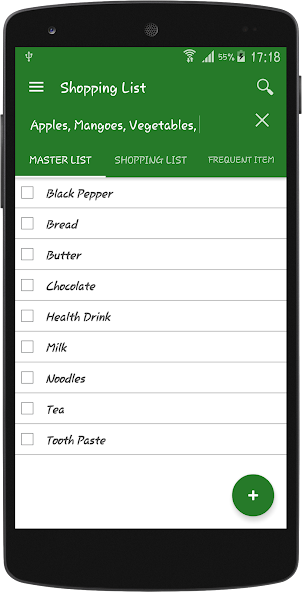
Shopping List is a handy and intuitive tool designed to simplify your shopping experience. It helps you effortlessly create and manage your shopping lists, track purchased items, and identify what's still needed, all in a very simple and efficient way.The application features two main tabs for optimal organization:
1. **Master List:** This serves as your comprehensive database. You can populate it with all the items you regularly shop for or might need in the future. Adding items to the Master List is a one-time entry, saving you time on subsequent shopping trips.
2. **Shopping List:** This is your active shopping list. When you're ready to shop, simply browse your Master List, select the items you need, and they will automatically appear on your Shopping List.
While shopping, focus on the Shopping List tab, which displays only the items you selected. As you place items into your shopping basket/kart/Trolley, tap on the item in the app to mark it as 'shopped.' This will strike through the item, visually indicating that you've already picked it up.
For added convenience, a "Delete Shopped Item" button is located at the bottom of the Shopping List tab. Tapping this button removes all struck-off items from the list, leaving only the items you still need to purchase, ensuring a clean and focused shopping experience.
Shopping List is a fantastic, easy-to-use tool that is beneficial for everyone, especially for grocery shopping, helping you stay organized and efficient.
Was ist neu
version 5.6: continued with older Shopping List release
- Bug fixes arrive after the last release
- Added Import Functionality
- Compatibility improvements for the latest Android version
- You also install the last update if you liked.
Shopping List Pro https://play.google.com/store/apps/details?id=com.technix.shoppinglistpro
- Export your Master List before an update.


