
Fire TV Universal Remote Android TV KODI CetusPlay
APK herunterladenFire TV Universal Remote Android TV KODI CetusPlay Anwendungsbilder



Fire TV Universal Remote Android TV KODI CetusPlay AI Redakteursbewertung
Fire TV Universal Remote offers seamless control over Android TVs, TV boxes, Chromecast, and KODI. CetusPlay simplifies navigation and media playback, enhancing your entertainment experience. Easy setup and intuitive interface make it a top choice.
Umfassende Analyse
Fire TV Universal Remote, powered by CetusPlay, provides a convenient solution for controlling your Android TV, TV box, or Chromecast. The app simplifies navigation with an intuitive interface and supports media playback control. Setup is straightforward, allowing quick connection to devices on the same network. While generally reliable, some users may experience occasional connectivity problems. The app's ad-supported nature might also disrupt the user experience at times, but overall, it offers a valuable remote control alternative.
Hauptvorteile
- Universal compatibility with Android TV, TV boxes, and Chromecast
- Simplified navigation and media playback with CetusPlay
- Easy setup and intuitive user interface
Verbesserungsbereiche
- Potential connectivity issues on some devices
- Ad-supported interface may interrupt usage
Die Beschreibung von Fire TV Universal Remote Android TV KODI CetusPlay
Site Editorial Commentary:Fire TV Stick Universal Remote Control for TV, KODI, Chromecast, Android TV box+
CetusPlay is a universal remote control app designed for Android TV, TV boxes, Chromecast, Fire TV, Fire TV Stick, KODI, Smart TVs, and more. It provides a seamless alternative to traditional TV remotes, offering a range of enhanced functionalities. This unique TV remote aims to support virtually all TVs worldwide, delivering more than just basic remote control features.[IMPORTANT]:
• We are actively seeking assistance with language localization to better serve our global user base.
• Please ensure that both your TV and phone are updated to their latest software versions for optimal performance.
• Mouse mode is supported on Fire TV/Stick (with ADB debugging enabled), rooted Android TVs, and Android media boxes.
• The scroll feature is exclusively available on Android boxes equipped with the CetusPlay Plugin.
What is CetusPlay?
• CetusPlay serves as a multi-functional remote control application for Android TV boxes, Fire TV devices, and Android TVs.
Key Features:
• Offers multiple navigation modes, including Direction-Pad, Touch Pad, keyboard mode, and Mouse mode, catering to diverse user preferences.
• Enables casting of local files (photos, videos, DOC, XLS, PPT, TXT, etc.) from your phone to the TV screen.
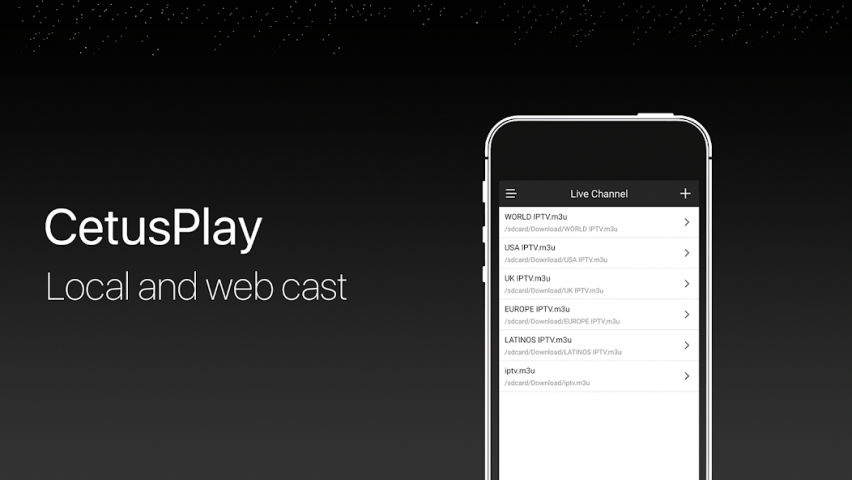
• Features Live Channels, allowing you to add local M3U files and stream them to your TV/Box/Stick.
• Provides quick access to launch TV apps with a single tap on your phone.
• Includes a cache and trash cleaner to optimize your TV's performance with a single click on the accelerating ball.
• Facilitates sharing of screen captures to social media platforms while you are watching content.
• Assists in remotely installing KODI on Fire TV/Stick devices.
Requirements:
• Compatible with streaming media players, including Android TVs such as Google Nexus Player, NVIDIA Shield TV, Fire TV/Stick, and Android TV Boxes like MXQ, MX Pro, H96 Pro, M8S Box. (Please contact us with your device model if you encounter any compatibility issues.)
• Requires Android devices for remote control functionality.
notes:
For New Fire TV/Stick Users:
• Enable ADB debugging and restart your Fire TV/Stick.
• Install the CetusPlay phone app, connect it to your Fire TV, and allow the CetusPlay TV version to be installed on the TV device.
For Updated Fire TV/Stick Users:
• Ensure that you have installed the latest versions of both the phone app and the TV version on your streaming media player.
• Verify that both devices are connected to the same Wi-Fi network.
• For mouse click functionality, app sideloading, and other premium features, ADB debugging must be enabled on your streaming media players. The in-app Help Center provides guidance through the setup process.
For Android TV Users:
• To fully utilize CetusPlay, follow these steps on your Android TV:
- Search for and install “CetusPlay- TV version” on your TV.
- Ensure that all devices are connected to the same Wi-Fi network.
Help & Support:
• Official website: http://www.cetusplay.com/
• Facebook page: https://www.facebook.com/CetusPlay/ (Search CetusPlay by pages on Facebook)
• email us: [email protected]
We value your feedback and are always eager to hear from you.
Supported Devices:
▶LeEco Android TV
▶Amazon Fire TV/Fire TV Stick
▶Nvidia Shield TV
▶Google Nexus Player
▶Globalsat GS500
▶XiaoMi Mi Box
▶ZIDOO X5/X9S/X6 PRO/X1/X9/X1
▶HiMedia Android TV box Q10 PRO/Q5 PRO/H8
▶PHILIPS Smart TV Box HMP8100
▶MELE PCG03/PCG01
▶PROBOX2
▶RIKOMAGIC MK902 II
▶MINIX NEO X7/X6/X8/Z64
▶Matricom G-Box
▶SkyStreamX Streaming Media Player
▶SkyStream ONE Box
▶RQN Android TV Box MXQ
▶Bros Unite M8S TV Box
▶KAT-TV "Elite"
▶PigflyTech Android TV Box
▶COOLEAD M8S TV Box
▶Mifanstech MXQ
▶MX III TV Box
▶DigiXstream DX4
▶Febite M8S TV Box
▶VENSMILE MXV Plus
▶Telmu MXIII-G
▶Monba M8S Set Top TV Box
▶Kudo TV KD1 Plus Android TV Box S812
▶Zenoplige MXQ
▶MXQ/MXQ PRO
▶Pigflytech MX3+ plus
▶Mansy Genuine KODI(XBMC) MX Pro
▶Jetstream Box
▶The Dragon Box
▶Tonbux SK-002
▶UBox Gen.2
▶GeekBox
▶Tronsmart
▶New NEXBOX
▶SONY Android TV
▶SHARP Android TV
▶MEMOBOX
▶NEXBOX
▶VONTAR Box
▶Tronsmart Vega Box
▶JoinWe Box
▶Andoer Box
▶Inphic Box
▶Transpeed Box
▶LeelBox
▶Vontar Box
▶Beelink Box
▶Docooler Box
▶NewBox
▶Kii Pro DVB
▶DigiXstream Box
▶Monba Box
▶Tictid Box
▶WELLWIN Nettech Box
▶Idroidnation Box
▶YFeel Box
▶Greatever Box
▶Mansy Box
▶AKASO Box
▶Globmall Box
▶DOLAMEE Box
▶Blvk Box
Was ist neu
Crash and, bug fixed with optimized SDK version and complying with the API requirement


