
Rokie
APK herunterladenRokie Anwendungsbilder



Rokie AI Redakteursbewertung
Rokie is a remote control app designed for Roku streaming devices, offering a convenient way to navigate and control your Roku from your Android phone. It simplifies Roku control with an intuitive interface. A great alternative to your physical Roku remote.
Umfassende Analyse
Rokie is a remote control application that provides a user-friendly way to manage Roku streaming devices. The app allows users to navigate menus, control playback, and search for content directly from their Android phones. Setup is generally straightforward, requiring the Roku and phone to be on the same Wi-Fi network. The interface is intuitive, mimicking the functionality of a physical Roku remote. While it offers convenience, a stable Wi-Fi connection is essential for optimal performance, and compatibility may vary across different Roku models. Overall, Rokie offers a handy solution for controlling your Roku.
Hauptvorteile
- Easy to use interface for Roku control
- Convenient alternative to a physical remote
- Quick setup and connection to Roku devices
Verbesserungsbereiche
- May require a stable Wi-Fi connection
- Potential compatibility issues with older Roku models
Die Beschreibung von Rokie
Site Editorial Commentary:Remote for TCL, Hisense, Insignia, Hitachi, RCA, Westinghouse Roku TV
Rokie is the ultimate remote control solution for your Roku Streaming Player and Roku TV. Experience a beautifully designed and intuitive interface, free from cluttered buttons and complicated settings. This application simplifies access to your favorite movies, music, and games, enhancing your overall Roku experience. Simply connect your Android device and Roku to the same Wi-Fi network to get started.Need a free and reliable Roku remote? The Rokie app provides seamless control over your media player. Effortlessly manage content playback, launch applications, and input text on your Roku device. The expansive touchpad ensures incredibly convenient navigation through menus and content.
Rokie also functions as a fully featured remote for your Roku TV. Adjust the volume and effortlessly switch channels directly from the app. Enjoy automatic connection to your media player, so your Roku remote is ready to use immediately upon launching the app.
Key Features of Rokie:
- Wide Compatibility: Works with all Roku TVs, including models from TCL, Sharp, Insignia, and Hitachi.
- Comprehensive Roku Remote Controls: Full functionality for conTrolling your Roku devices.
- Automatic Connection: Automatically connects to your Roku device for instant control.
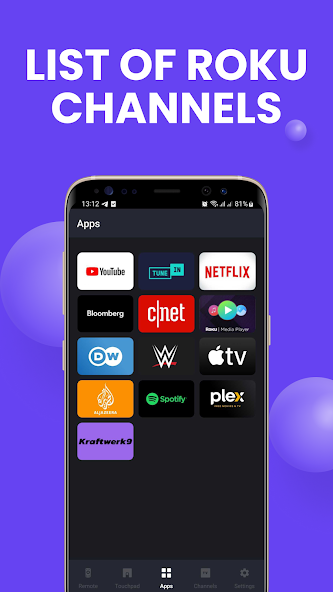
- App List with Large Icons: Easily access your favorite apps with a convenient list and large, recognizable icons.
- Roku TV Control: Adjust volume and switch TV channels directly from the app.
- Quick Text Entry: Use the keypad for fast and easy text input.
- Flexible Navigation: Choose between button-based or touchpad navigation.
- Content Playback Control: Easily control playback of your favorite movies, shows, and music.
- Simple and Intuitive Interface: Enjoy a user-friendly experience.
- Wear OS Support: Control your Roku from your wrist with Wear OS support.
Compatibility:
- Rokie supports all Roku models, including Streaming Stick, Express, Express+, Premiere, Premiere+, Ultra, and Roku TV models from TCL, Sharp, Insignia, Hisense, and RCA, Hitachi.
- Please note that some applications, such as YouTube and Hulu+, utilize their own on-screen keyboards and may not accept input from the Android keyboard.
Disclaimer:
Kraftwerk 9, LTD is an independent entity and is not affiliated with Roku, Inc. The Rokie application is not an official product of Roku, Inc.
Was ist neu
Improvements for reliability and speed


