
Smart AudioBook Player
Download ApkSmart AudioBook Player Application Screenshots

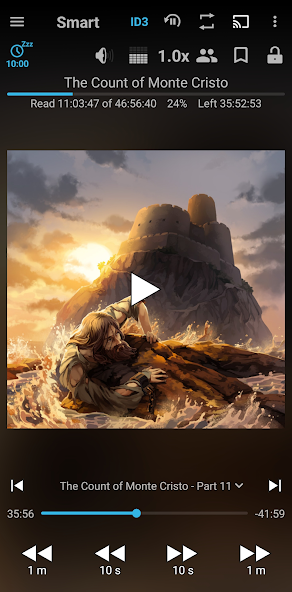


Smart AudioBook Player AI Editor's Review
Smart AudioBook Player is a dedicated audiobook player with advanced features like playback speed control, bookmarks, sleep timer, and customizable widgets. It's designed for serious audiobook listeners seeking a tailored listening experience.
Comprehensive Analysis
Smart AudioBook Player excels as a specialized audiobook application. It offers precise playback speed adjustments, automatic bookmarking to remember your place, and convenient chapter navigation. The inclusion of customizable widgets and a sleep timer further enhances the listening experience. While the user interface might benefit from a more contemporary design, and support for niche audio formats could be improved, its core functionality caters effectively to audiobook enthusiasts seeking a robust and feature-rich player.
Key Advantages
- Variable playback speed with fine-grained control
- Automatic bookmarking and chapter navigation
- Customizable widgets and sleep timer functionality
Areas for Improvement
- User interface could be more modern and intuitive
- Limited support for less common audio formats
The description of Smart AudioBook Player
Site Editorial Commentary:This application is full of useful features for playing audio books
Smart audiobook Player is meticulously crafted for Immersive audiobook listening on your Android device. Enjoy your favorite audiobooks with a suite of powerful features designed to enhance your experience.To get started, simply download your audiobooks and organize them into individual subfolders within the designated "My Audiobooks" folder on your phone. Each book, regardless of the number of files it contains, must reside in its own subfolder. Then, in the app, navigate to Library→Settings→Root folder and select "My Audiobooks". Remember to tap the "Update" button at the top of the Library window to refresh your library.
Experience the full version free for the first 30 days, after which you'll transition to the Basic version. Key features include:
+ **Playback Speed Control:** Adjust the narration speed to your preference, whether you need to slow down a fast speaker or speed up a slow one.
+ **Book Classification:** Easily track your progress with intuitive categories like 'New,' 'Started,' and 'Finished' to see your audiobook journey at a glance.
+ **Downloadable Covers:** Enrich your library with cover art downloaded from the internet, replacing generic placeholders.
+ **Bookmarks:** Save and revisit important or interesting passages with custom bookmarks.
+ **Character List:** Create and manage a list of characters to help you keep track of the story's players.
+ **sleep Timer:** Automatically pause playback when you fall asleep. Simply shake your phone to resume listening.
+ **Playback History:** Effortlessly return to your previous listening point, even if you accidentally skip chapters.
+ **Chromecast Support:** Enjoy your audiobooks on larger speakers via Chromecast.
+ **Application Widget:** Control playback directly from your home screen with the convenient widget.
+ **Independent Progress Saving:** Start new books without losing your place in others, as progress is saved individually for each title.
+ **Ad-Free Experience:** Enjoy uninterrupted listening with absolutely no advertisements!
To purchase the full version, go to menu--Help--Version tab. This is a one-time purchase, not a subscription.
We appreciate all the feedback and suggestions from our users. If you encounter any issues, please contact us via email for direct assistance.
For Android 4.4 - 5.1, use this version: https://drive.google.com/file/d/159WJmKi_t9vx8er0lzTGtQTfB7Aagw2o
For Android 4.1 - 4.3, use this version: https://drive.google.com/file/d/1QtMJF64iQQcybkUTndicuSOoHbpUUS-f/view?usp=sharing
Version with the old icon: https://drive.google.com/open?id=1lDjGmqhgSB3qFsLR7oCxweHjnOLLERRZ
What's New
+ Added Description from Gemini.To use it long press on the book in the Library window and select "Search description on Goodreads".Then tap on the button at the top-right corner of the screen.+ Added Recommendations from Gemini.To use it long press on the book in the Library screen or in Library--menu--Playback statistics.It recommends what to read next.+ In the Full version added Cover from Gemini.It is available at the top-right corner of Search cover on the Internet screen.


