
Cool Q Launcher
Download ApkCool Q Launcher Application Screenshots



Cool Q Launcher AI Editor's Review
Cool Q Launcher offers a sleek and customizable Android experience. It boasts a clean interface and valuable features for personalization, making it a strong contender for users seeking a fresh look and enhanced control over their home screen.
Comprehensive Analysis
Cool Q Launcher provides a visually appealing and efficient home screen replacement. It offers a range of customization options, including themes, icon packs, and gesture controls, allowing users to personalize their Android experience. The launcher is designed to be user-friendly, though advanced customization options might require some exploration. While generally smooth, performance may vary depending on device hardware. Overall, it's a solid choice for users seeking a modern and customizable launcher.
Key Advantages
- Sleek and modern user interface
- Highly customizable themes and icons
- Valuable features for personalization
Areas for Improvement
- May require some learning curve for advanced customization
- Potential for performance impact on older devices
The description of Cool Q Launcher
Site Editorial Commentary:Happy Launcher is sleek launcher with many valuable features, happy smile faces
Cool Q Launcher is a sleek and highly customizable launcher designed to bring a refreshing and modern look to your Android device. With a wide array of valuable features, Cool Q Launcher offers a personalized experience that caters to your unique preferences.❤️ Experience the Cool Q Launcher difference! ❤️
❤️ Who will benefit from Cool Q Launcher?
1. Users seeking a more powerful, visually appealing, and feature-rich launcher compared to their device's default option.
2. Individuals looking to revitalize older phones with a Modern and up-to-date interface.
Notice:
1. Android™ is a registered trademark of Google, Inc.
Cool Q Launcher Features:
+ Broad Compatibility: Cool Q Launcher supports almost all Android phones, ensuring smooth performance on Android 5.0+ devices.
+ Icon Customization: Personalize your app icons by changing their shape and color, creating a sleek and unique aesthetic.
+ Extensive Theme and Wallpaper Library: Access a vast collection of beautiful launcher themes and wallpapers from the online store.
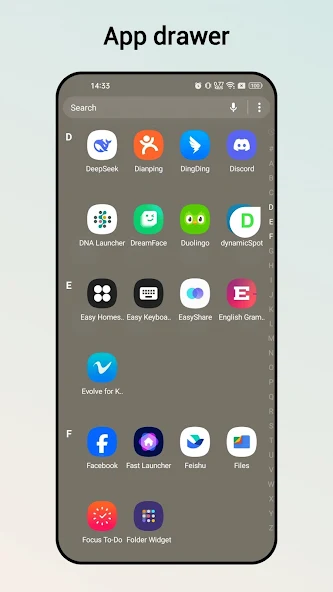
+ Versatile Drawer Styles: Choose from four drawer styles: horizontal, vertical, category, or list drawer, to organize your apps effectively.
+ Intuitive Gestures: Utilize nine gestures, including swipe, pinch, and two-finger gestures, for quick and easy navigation.
+ Customizable Color Modes: Select from light, dark, or automatic color modes to match your environment and preferences.
+ Enhanced Privacy: Hide apps and lock hidden apps for added privacy and security.
+ App Lock: Protect your sensitive apps with the built-in app lock feature.
+ Immersive Full-Screen Experience: Round corner screen feature makes your phone look like a full screen phone.
+ Unread Notification Badges: Stay informed with unread notification badges displayed on launcher desktop icons.
+ Deep Customization Options: Fine-tune your launcher with options to change icon size, launcher grid size, font, Dock background, folder color, folder style, and more.
+ Icon Pack Support: Cool Q Launcher is compatible with almost all icon packs designed for third-party launchers.
+ Dynamic Wallpapers: Enjoy the visual appeal of video wallpapers and live wallpapers.
+ Transition Effects: Choose from a variety of desktop transition effects for a visually engaging experience.
+ Smart Search: Quickly find apps and contacts with T9 search functionality on the launcher desktop.
+ Multi-Dock Pages: Expand your dock space with support for multiple dock pages.
❤️ We hope you enjoy using Cool Q Launcher! ❤️
If you find Cool Q Launcher to be a valuable tool, please rate it to help us improve and provide an even better experience for all users!
What's New
v7.5 1. Fix bug: when users unlock screen and go into our launcher, it may pops up ads at the time our launcher got focused


