
Android Accessibility Suite
Download ApkAndroid Accessibility Suite Application Screenshots


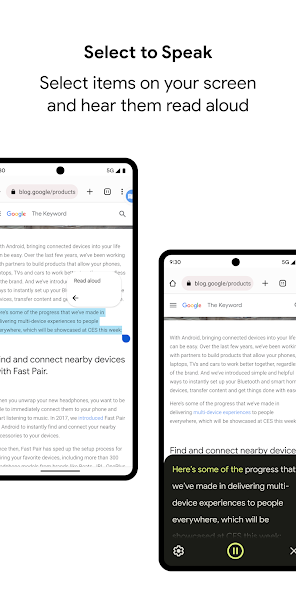

Android Accessibility Suite AI Editor's Review
Android Accessibility Suite enhances device usability for users with disabilities. It offers features like TalkBack screen reader, Select to Speak, and Switch Access, making Android devices more accessible and customizable to individual needs. A must-have for inclusive device interaction.
Comprehensive Analysis
Android Accessibility Suite is designed to make Android devices more accessible. It includes TalkBack, a screen reader providing spoken feedback; Select to Speak, which reads selected text aloud; and Switch Access, enabling device control via external switches. The suite enhances user experience by tailoring device interaction to individual needs. While setup can be complex initially, the customizable options ultimately create a more inclusive and user-friendly experience.
Key Advantages
- Comprehensive suite of accessibility tools
- Highly customizable to individual needs
- Improves device usability for users with disabilities
Areas for Improvement
- Can be overwhelming for new users due to many options
- TalkBack may require adjustment for experienced users
The description of Android Accessibility Suite
Site Editorial Commentary:Includes TalkBack, Accessibility Menu, and more.
Android Accessibility Suite is a comprehensive suite of accessibility tools designed to empower users to interact with their Android devices eyes-free or using switch devices. This suite enhances the Android experience for users with visual or motor impairments, offering a range of customizable features. Key components of the Android Accessibility Suite include: * **Accessibility Menu:** Provides a large, easily accessible on-screen menu for essential device controls. Users can effortlessly lock their phone, adjust volume and brightness, capture screenshots, and perform other actions with a simple tap. * **Select to Speak:** Enables users to select specific items on the screen, such as text or images, and have them read aloud. This feature is invaluable for accessing content and navigating apps. * **TalkBack Screen Reader:** A fully-featured screen reader that delivers spoken feedback, allowing users to navigate their devices using gestures and interact with on-screen elements. TalkBack also supports braille keyboard input for users who are blind or visually impaired. Getting Started: 1. Navigate to your device's Settings app. 2. Select Accessibility. 3. Choose from Accessibility Menu, Select to Speak, or TalkBack to configure the desired accessibility features. Permissions Notice: * Phone: The app monitors phone state to intelligently adapt announcements based on call status, ensuring uninterrupted communication. * Accessibility Service: As an accessibility service, the app requires permission to observe user actions, retrieve window content, and monitor typed text to provide relevant and personalized assistance. * Notifications: Granting notification permission allows TalkBack to keep you informed about important updates and new features.What's New
TalkBack 17.0 • More ways to customize your braille display • A more reliable keyboard experience • More reading control hints when navigating with a physical keyboard


