
MR.TIME
Download ApkMR.TIME Application Screenshots


MR.TIME AI Editor's Review
MR.TIME offers a vast marketplace of smartwatch watch faces, boasting over 2 million options. Personalize your smartwatch with unique designs, explore diverse styles, and enjoy regular updates. While customization is rich, battery consumption and interface intuitiveness could be improved.
Comprehensive Analysis
MR.TIME provides a comprehensive marketplace for smartwatch watch faces. Users can browse a vast library of designs, ranging from classic to modern, and personalize their smartwatches to reflect their individual styles. The app offers various customization options, allowing users to tweak colors, complications, and layouts. While the sheer number of choices is impressive, the app's interface can feel overwhelming at times. Battery drain may also be a concern with some of the more complex watch faces. Overall, MR.TIME delivers a rich customization experience but could benefit from interface improvements and optimization for battery life.
Key Advantages
- Extensive collection of over 2 million watch faces.
- Diverse range of styles to suit individual preferences.
- Regular updates with new watch face designs and features.
Areas for Improvement
- Potential for increased battery consumption due to custom watch faces.
- Interface navigation could be more intuitive for new users.
The description of MR.TIME
Site Editorial Commentary:Custom Watch Face Marketplace: The Ultimate Platform for Smartwatches.
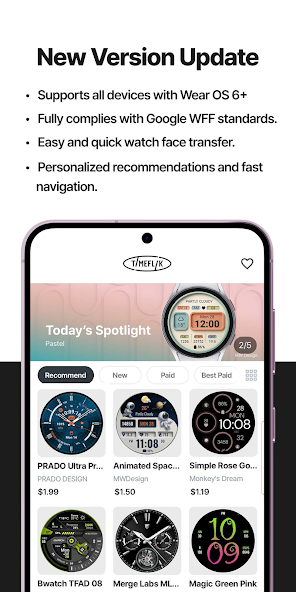
Discover MR.TIME, the leading smartwatch watch face marketplace, offering an unparalleled selection of over 2 million watch faces globally.Officially supporting Galaxy Watch 7, 8 Series, and all Wear OS 6+ devices! For Wear OS 6 users, switch to the new version via My Page > Settings.
Be sure to INSTALL OUR WATCH APP! Set the TIMEFLIK watch app on your watch screen for seamless watch face transfers.
⌚︎ Full Watch Face Format Support
Experience customizable features and battery-efficient WFF (Watch Face Format) designs.
⌚︎ One-Tap Application
Instantly change watch faces with a single tap – no cumbersome companion app needed.
⌚︎ Top designers
Explore stunning designs curated from over 50 professional designers.
⌚︎ Design Your Own Watch Faces
Unleash your creativity with TIMEFLIK's free templates! Personalize your watch faces with photos or free templates, including hands, subdials, battery status, health features (steps), weather, and UV index!
⌚︎ Fresh Styles Daily
Upgrade to a subscription for unlimited access to all watch faces. Enjoy your first year for just $19.99 (a $71.99 value).
Google Play's Best for Wear Winner.
[How to use?]
1. Install our watch app.
- Google Play: Wear OS by Google / Samsung Galaxy Watch 4, 5, 6, 7, Ultra, 8, 8 Classic
2. Set TIMEFLIK as your watch face.
- Go to the Wearable app > Watch faces > and choose Timeflix from the "Downloaded" list.
[Health Connect Permission Request]
TIMEFLIK requests Health Connect permission from your mobile device to offer these features:
1. Check your step count directly on your watch face. Real-time activity tracking helps you monitor your health and stay motivated.
2. Enjoy dynamic design updates (e.g., color changes or animations based on your step count) using step data.
TIMEFLIK uses Health Connect data only for watch face information and does not use it for ads, data sales, or syncing with incompatible platforms. Access is limited to read-only StepsCadence/Steps, and you can manage or delete permissions in the app settings.
NOT Supported:
Huawei OS (Huawei Watch GT/GT2)
Xiaomi OS (Amazfit GTS / Pace / Bip / ... )
FitBit
Garmin
SUPPORTED:
Wear OS by Google
Samsung Galaxy Watch8 / Watch8 Classic
Samsung Galaxy Watch7 / Watch7 Ultra
Samsung Galaxy Watch6 / Watch6 Classic
Samsung Galaxy Watch5 / Watch5 Pro
Samsung Galaxy Watch4/Watch4 Classic
Asus Gen Watch 1, 2, 3
CASIO Series
Fossil Q Series
Guess Wear
Huawei Watch 2 Classic/Sport
Huawei Watch
Hublot Big Bang e
Mobvoi Ticwatch Series
Moto 360 Series
New Balance run IQ
Oppo Watch
Polar M600
SUUNTO 7
Verizon Wireless Wear24
[Available in Apple watch? / What about Wear OS Watches not in the list?]
TIMEFLIK Android app has to be synced with TIMEFLIK Wear OS/Tizen watch app. So if you don’t have both Android phone + Wear OS/Tizen smart wearable, please understand its feature will be limited.
[Access Permission Request(Optional)]
Location: To show weather information precisely based on a location.
Health Connect: Permission to use StepsCadence/Steps is required to display step counts from the mobile device on the watch face.
Storage: To send watch faces or read and write files in smartphones and SD cards.
[Disclaimer]
This app is unavailable on the smartwatch below Wear OS 2.0.
Mobile app installation is necessary for smartwatches powered by Wear OS 2.0. or higher.
Some functions of the smartwatch app require interaction with the mobile app.
When logging in to the smartwatch app, check the passcode on the mobile and enter it.
What's New
- Bug fixes and stabilizationIf you have any questions, please contact us by the following email :)([email protected])


