
Samsung Health
Download ApkSamsung Health Application Screenshots

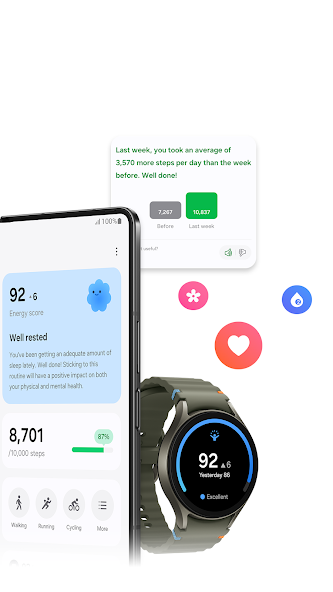

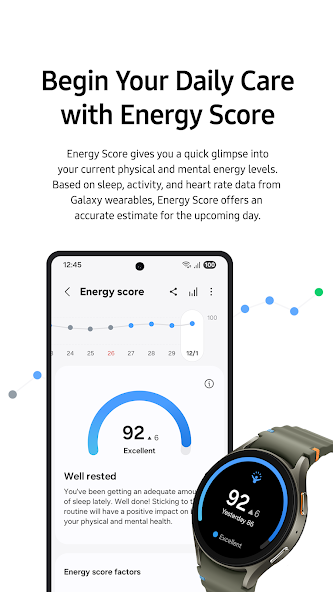
Samsung Health AI Editor's Review
Samsung Health is a comprehensive app for tracking fitness, diet, and sleep. It offers personalized insights and integrates seamlessly with Samsung devices, making it a valuable tool for health management. While feature-rich, some users may find the interface overwhelming.
Comprehensive Analysis
Samsung Health provides a wide range of features to help users manage their well-being. It tracks activity levels, sleep patterns, and dietary intake, offering personalized insights based on the data collected. The app seamlessly integrates with Samsung devices like Galaxy Watches, enhancing data accuracy and convenience. While the app offers a user-friendly interface, the sheer number of features may initially overwhelm some users. Overall, it's a robust platform for those committed to monitoring and improving their health.
Key Advantages
- Comprehensive health tracking features (activity, sleep, diet)
- Seamless integration with Samsung devices and wearables
- Personalized insights and coaching
Areas for Improvement
- Can be overwhelming for new users due to feature complexity
- Accuracy of some measurements may vary
The description of Samsung Health
Site Editorial Commentary:Lifestyle companion to track your fitness, weight, diet, food & sleep.
Samsung Health is designed to help you cultivate healthy habits and proactively manage your well-being. This comprehensive application offers a wide array of features that make adopting and maintaining a healthy lifestyle more accessible than ever before. The app automatically records numerous activities, providing a seamless user experience. The intuitive home screen allows you to effortlessly monitor various health metrics. You can easily customize the items displayed, such as daily steps and activity duration, to suit your preferences. Track and manage your fitness activities, including running, cycling, and swimming, with detailed insights. For Galaxy Watch users, integration with Life Fitness, Technogym, and Corehealth enables more effective and personalized workouts. Develop mindful eating habits by logging your daily meals and snacks directly within Samsung Health, gaining better awareness of your dietary intake. Strive for your best condition by setting personalized goals and monitoring key health indicators such as activity levels, workout intensity, heart rate, stress levels, and blood oxygen saturation. Enhance your sleep quality with detailed sleep pattern monitoring via Galaxy Watch. Improve your sleep through sleep level analysis and sleep scores, leading to more refreshing mornings. Engage in friendly competition with friends and family through Samsung Health Together, making your journey to better health more enjoyable and interactive. Access a library of expert-led fitness videos covering various programs, including stretching and weight loss, to guide your workouts. Reduce daily stress with the Mindfulness feature, offering meditation tools and techniques. (Please note that some content requires an optional paid subscription and is available in English, German, Spanish, French, Portuguese, and Korean.) For women's health, cycle tracking provides support for menstrual cycle monitoring, symptom management, and personalized insights through integration with Natural Cycles. Samsung Health prioritizes the security of your private health data. The service is available on all Samsung Galaxy models released after August 2016 that are Knox enabled. Note that the Knox-enabled Samsung Health service is not available on rooted mobile devices. While the app supports a wide range of devices, tablets and some mobile devices may not be fully supported, and specific features may vary based on your country of residence, region, network carrier, and device model. Samsung Health requires Android 10.0 or later and supports over 70 languages, including English, French, and Chinese. An English version is available globally. It is important to remember that Samsung Health is intended for fitness and wellness purposes only and should not be used for the diagnosis, treatment, cure, or prevention of any disease or medical condition. The following permissions are required for optimal app functionality. Optional permissions are enabled by default but not allowed until granted by the user: Optional permissions: - Location: Required for collecting location data via trackers (exercises & steps), displaying exercise route maps, and providing weather information during exercise. - Body Sensors: Used for measuring heart rate, oxygen saturation, and stress levels (HR&Stress: Galaxy S5~Galaxy S10 / SpO2: Galaxy Note4~Galaxy S10). - photos and videos (storage): Allows you to import/export exercise data, save exercise photos, and save/load Food photos. - Contacts: Used to verify your Samsung account login and create a friend list for Together. - camera: Used to scan QR codes for adding friends in Together, take photos of food, and recognize numbers on blood glucose and blood pressure monitors (available in select countries). - Physical activity: Required for counting steps and detecting workouts. - Microphone: Used to record audio for snore detection. - Nearby devices: Used to scan for and connect to nearby devices, including Galaxy Watches and other accessories. - Notifications: Used to provide timely and relevant information. - Phone: Used to confirm your phone number for Together.What's New
• Track vitals to catch changesMonitor your sleep vitals to understand your health and get notified of meaningful changes.• Track daily cardio loadSee how your workouts and daily movement impact your heart — know when to push and when to rest. Your target load adjusts based on your recent activity.• Your hub for heart healthTrack metrics and lifestyle factors that affect your heart. Get a daily score from sleep, exercise, BMI, and vascular load to understand your heart health.


