TP-Link Tether
Download ApkTP-Link Tether Application Screenshots



TP-Link Tether AI Editor's Review
TP-Link Tether simplifies network management, offering easy access to your TP-Link devices. Configure settings, manage users, and monitor your network's performance from your smartphone. A user-friendly app for controlling your TP-Link routers and extenders.
Comprehensive Analysis
TP-Link Tether provides a convenient way to manage your TP-Link network devices. The app allows users to easily configure settings, manage connected devices, and monitor network performance. While it offers a user-friendly interface and remote access capabilities, advanced users might find the configuration options somewhat limited. Some users have also reported occasional connectivity problems, but overall, it simplifies router management for the average user.
Key Advantages
- Simple and intuitive user interface
- Remote network management from anywhere
- Easy device and user management
Areas for Improvement
- Limited advanced configuration options
- Occasional connectivity issues reported
The description of TP-Link Tether
Site Editorial Commentary:TP-Link Tether provides the easiest way to access and manage your devices.
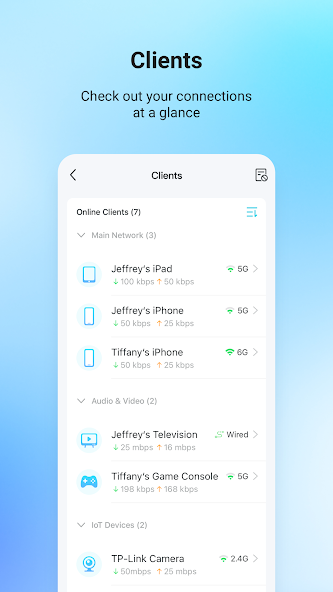
TP-Link Tether offers the simplest and most intuitive method to access and efficiently manage your TP-Link Router, xDSL Router, or Range Extender directly from your mobile devices. From a swift and straightforward setup process to comprehensive parental controls, Tether delivers an easy-to-use interface, allowing you to effortlessly monitor your device status, view connected client devices, and manage their network privileges.Key Features:
- Easily set up your device's SSID, password, and Internet or VDSL/adsL settings.
- Enhance your network security by blocking unauthorized users attempting to access your devices.
- Effectively manage permissions and access rights for all client devices connected to your network.
- Implement robust parental control features, including scheduled access and URL-based Internet access management, to ensure a safe online environment for your family.
- Utilize the app to find the optimal location for your range extender, ensuring maximum WiFi coverage throughout your home or office.
- Schedule automatic LED shut-off times to minimize distractions, especially during nighttime hours.
- Simultaneously manage multiple TP-Link devices from a single, centralized application.
Check the following link for Compatible Routers:
https://www.tp-link.com/tether/product-list/
*To determine your device's hardware version, please visit: http://www.tp-link.com/faq-46.html
Stay tuned for support for more devices in future updates!
Important notes:
● Firmware upgrade may be required for optimal performance. Please visit the download page to select the correct version and download the latest firmware: http://www.tp-link.com/support.html
● TP-Link Tether is designed for the main network and will not function correctly when connected to a guest network.
● If you encounter any issues or require assistance, please contact our support team at http://www.tp-link.com/support.html
What's New
Fixed some bugs and improved the stability.


