
Popup Ad Detector
Download ApkPopup Ad Detector Application Screenshots



Popup Ad Detector AI Editor's Review
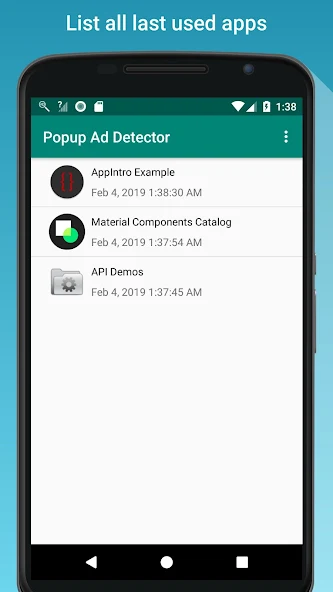
Popup Ad Detector helps identify apps causing disruptive popup ads on your Android device. It pinpoints the source, allowing you to uninstall the offending app and enjoy an ad-free experience. Simple to use and effective for finding the culprit!
Comprehensive Analysis
Popup Ad Detector is designed to help users identify the source of annoying popup ads on their Android devices. It works by monitoring app behavior and pinpointing which application is responsible for displaying the intrusive ads. While it doesn't block the ads themselves, it provides users with the information needed to uninstall the offending app. The app is straightforward to use, making it accessible even to those who are not tech-savvy. Overall, it's a useful tool for maintaining a clean and ad-free mobile experience.
Key Advantages
- Effectively identifies apps causing popup ads.
- Simple and easy-to-use interface.
- Helps users regain control over their device's ad experience.
Areas for Improvement
- Does not block popup ads; only identifies the source.
- May require some manual effort to uninstall the identified app.
The description of Popup Ad Detector
Site Editorial Commentary:No more wasting time on finding which app causing pop-up ad!
**IMPORTANT:** This app *does not block* pop-up ads and *does not* detect in-app pop-up ads. Also, it *will not* tell you which app contains ads. It only identifies the app that is actively causing the pop-up ad to appear.Are you frustrated trying to figure out which app is responsible for those annoying pop-up ads?
**Popup Ad Detector** is here to help! It effectively detects the source of:
1. Lock screen ads
2. Home screen ads
3. Ads displayed over other apps
4. Notification bar ads (Airpush detector)
**How it works:**
After setup, a floating icon will appear on your screen.
The next time a pop-up ad appears, the icon will indicate the app from which the ad originated.
You can then easily uninstall the offending app and say goodbye to unwanted pop-up ads!
**To ensure Popup Ad Detector functions correctly, you must:**
1. Grant Accessibility access.
2. Allow the app to display over other apps.
**Known Issues:**
The floating icon may interfere with the clickability of some apps. To resolve this, manually disable the floating icon temporarily and re-enable it after you've finished using the other app.
If you successfully identify an intrusive app causing pop-up ads, please leave a positive review to let others know that Popup Ad Detector is effective!
For questions or suggestions, please contact me at [email protected]. I will respond as soon as possible.
What's New
Popup Ad Detector - Help you figure out what app was sending you pop-up ads.v2.7.11. Compatible with Android 15.


