
Calendar
Скачать APKCalendar Скриншоты приложения



Calendar AI Обзор редактора
Calendar is a visually appealing and functional app with a modern design. It helps users organize their schedules effectively. Despite minor drawbacks, it offers a seamless and colorful experience for managing appointments and events.
Комплексный анализ
The Calendar app boasts a state-of-the-art, colorful design that immediately captures attention. Its intuitive interface makes scheduling and managing events straightforward. Users can easily add appointments, set reminders, and view their schedules in various formats. While the app generally performs well, some users may experience occasional synchronization delays. The app offers a visually appealing and user-friendly experience for managing daily schedules, despite the limited customization. It is overall a useful tool for staying organized.
Ключевые преимущества
- Visually appealing and modern colorful design
- Easy to use and intuitive interface
- Effective scheduling and organization features
Области для улучшения
- May have occasional synchronization issues
- Limited customization options for some users
Описание Calendar
Site Editorial Commentary:Colorful calendar with Events, Reminders, Notes, Checklist, Holidays and Weather
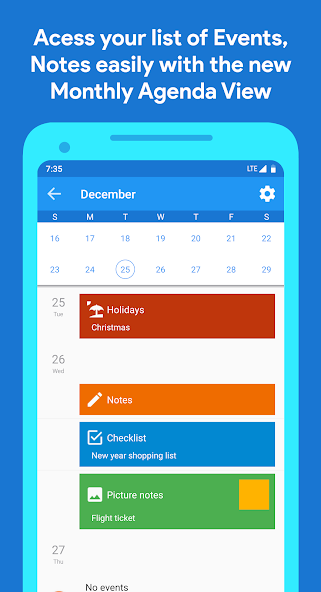
The calendar App offers a state-of-the-art, colorful design combined with powerful productivity features. Effortlessly manage your schedules, events, appointments, notes, and daily tasks with this intuitive calendar application.Now, seamlessly synchronize all your events added within the app with your Google Calendar account for enhanced accessibility and organization.
Key Features:
✓ Create and manage events with ease.
✓ Enjoy seasonal themed calendars for a visually appealing experience.
✓ Synchronize your events seamlessly with Google Calendar.
✓ Set customized reminders for events to stay on track.
✓ Establish daily and one-time reminders with detailed notes.
✓ Secure your app with fingerprint lock.
✓ Utilize secure PIN lock for added privacy.
✓ Access daily and weekly weather forecasts.
✓ Create and manage checklists for efficient task management.
✓ Stay informed with updated holidays and festivals for 2025.
✓ Navigate with separate month and year views.
✓ Add specific notes for each day.
✓ Utilize the diary feature for personal reflections.
✓ Share event invitations with friends using QR codes.
✓ Add picture notes using the built-in camera.
✓ Add and manage voice notes for quick memos.
✓ Add and customize holidays to personalize your calendar.
✓ Experience beautiful Material Design themes for each month.
✓ Backup your notes and event details, and restore them when needed with the data backup feature.
Permission Usages:
★ com.android.alarm.permission.SET_ALARM: Used for setting reminders.
★ android.permission.WRITE_EXTERNAL_STORAGE: Used for saving picture notes.
★ android.permission.CAMERA: Used for capturing picture notes.
★ android.permission.ACCESS_FINE_LOCATION, android.permission.ACCESS_COARSE_LOCATION: Used to provide daily and weekly weather forecasts for your location.
★ android.permission.READ_CONTACTS: Used for adding contact names when creating events.
★ com.android.alarm.permission.RECORD_AUDIO: Used for adding and managing voice notes.
★ com.android.alarm.permission.modIFY_AUDIO_SETTINGS: Used for managing audio settings for voice notes.
★ android.permission.READ_CALENDAR, android.permission.WRITE_CALENDAR: Used for synchronizing your events with Google Calendar.
P.S. Thank you for your ongoing support of this application. We appreciate your feedback and feature suggestions. Your input motivates us and helps us improve the app continuously.


