
Holiday Art
APK 다운로드Holiday Art 앱 스크린샷



Holiday Art AI 편집자의 리뷰
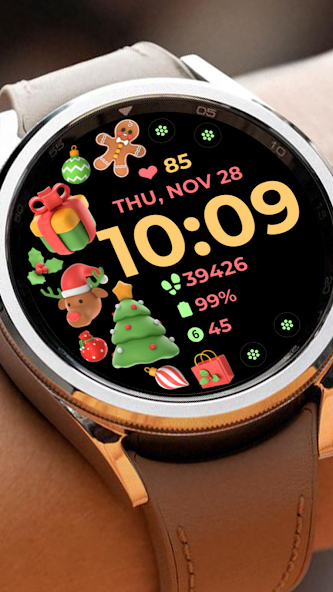
Holiday Art offers a festive collection of watch faces to personalize your smartwatch for any occasion. Enjoy a variety of themed designs and easily switch between styles to celebrate holidays in style. A simple way to keep your watch feeling fresh and unique.
종합 분석
Holiday Art provides a straightforward way to customize your smartwatch with festive watch faces. The app focuses on offering a diverse range of themed designs suitable for various holidays and celebrations. Installation is simple, and switching between watch faces is user-friendly. While the app excels at personalization, its functionality is primarily limited to changing the appearance of the watch face. Users should also be mindful of potential battery drain depending on the complexity of the chosen design.
주요 장점
- Wide variety of holiday-themed watch faces.
- Easy to install and switch between designs.
- Enhances smartwatch personalization.
개선 영역
- Limited functionality beyond changing watch faces.
- May consume battery life depending on the watch face complexity.
설명 Holiday Art
Site Editorial Commentary:Christmas and New Year - Themed Watchface
INSTALLATION GUIDEOur 'Holiday Art' watch face app, thoroughly tested on a real device (Galaxy Watch 4), is 'reviewed and approved' by the Google Play Store Team before its release. We are committed to providing a seamless experience, and we're here to help!
⚠️ Before leaving a review, please contact us at [email protected]. We'll provide screenshots and detailed instructions to ensure successful installation. We're happy to assist you every step of the way.
IMPORTANT noteS:
1️⃣ Watch faces generally install automatically on your watch. You'll see a download icon during installation.
2️⃣ Ensure your watch is strongly connected to your phone via the same Wi-Fi network. Also, make sure you're logged into your Google account on your watch for a smooth installation.
3️⃣ After the download, allow a few minutes for the watch face to transfer to your watch. You'll receive a notification on your watch upon successful transfer.
4️⃣ If you don't receive a notification, go to the Play Store on your watch and search for "Holiday Art".
5️⃣ The watch face should appear; tap the install button.
⭐️ After successful installation, the watch face won't automatically apply. Return to your home display, tap and hold the display, swipe to the end, and tap the '+' icon to add the watch face. Rotate the bezel to locate 'Holiday Art'.
Please refer to the Feature graphics for detailed installation guidance.
⭐️ Ensure all necessary permissions are ALLOWED / ENABLED within your watch's settings: Settings -> Applications -> Permissions.
⚠️ Refunds are available within 24 hours of purchase.
This watch face was expertly developed using Samsung's "Watch Face Studio" tool, optimized for devices running the new Wear OS Google / One UI Samsung operating system, such as the Samsung Galaxy Watch 4.
FEATURES:
- Digital Clock
- Date & Day
- Always-On Display (AOD)
- Preset App Shortcuts
- Customizable App Shortcuts & Complications
- Changeable Styles & Color Palette
Note: Some features may not be available on all watch models.
Explore our full collection: https://play.google.com/store/apps/developer?id=Bloomfield+Watchfaces
Contact us: [email protected]
Facebook Page: https://www.facebook.com/bloomfieldwatchfaces
YouTube Installation Tutorial: https://www.youtube.com/watch?v=vMM4Q2-rqoM


