
Progress
APK 다운로드Progress 앱 스크린샷
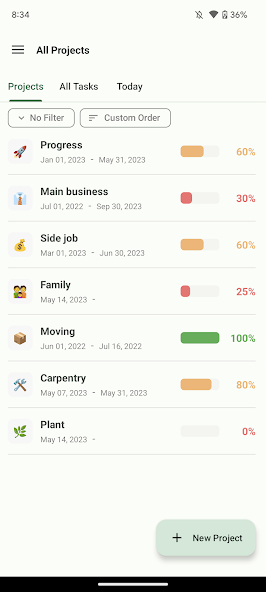


Progress AI 편집자의 리뷰
Progress is a project management app that helps users visualize their project's progress effectively. With simple UI, it allows users to monitor tasks, track milestones, and stay organized, ensuring projects are completed on time.
종합 분석
Progress is a straightforward app designed to help users manage projects and visualize progress. It allows users to easily input tasks, set deadlines, and track milestones. The app’s clear visual representations of progress make it easy to see how a project is advancing. While it offers a simple and effective solution for individual project management, it lacks advanced features and collaboration tools that are essential for team-based projects. The user interface is clean and easy to navigate, providing a pleasant user experience.
주요 장점
- Simple and intuitive user interface for easy navigation
- Effective visualization of project progress with clear charts
- Helps users stay organized and manage tasks efficiently
개선 영역
- Limited advanced features for complex project management
- Lack of collaboration tools for team projects
설명 Progress
Site Editorial Commentary:The project management apps for your project progress.
Progress is a project management application designed to help you visualize and manage your project's progress effectively. It automatically calculates the overall project achievement based on the progress entered for each task, providing a clear overview of your project's status.Simply input the tasks and to-dos required to complete your project, and Progress will help you stay on track. The application allows you to set deadlines, and it will automatically calculate and display your daily quota, enabling easy project management until the deadline.
For ambitious plans, the path to completion can be long and challenging. Progress helps you overcome these challenges by providing constant visibility of your progress, ensuring you stay motivated and informed about how your plans are advancing.
Key features and configurations include:
* **Configuration:** Project -> Tasks -> Subtasks
* **Operations:** Create projects and register tasks. Enter the task progress rate, and the overall progress is automatically calculated.
* **Features:**
* Task management for each project
* Display the progress rate of each project in a list
* Project archive
* Set start and due dates
* Automatically calculate daily targets until the due date
* Enter notes
* Create subtasks
* Today's task screen
* Push notifications for tasks due today
* Today progress widget
Progress offers a subscription option to unlock additional features:
* Create a project group
* Create subtasks up to 6 layers
* Freely customize progress bar color
The app is free to use with optional subscription for premium features. Progress provides the tools you need to stay organized, manage deadlines, and achieve your project goals.


