
MP3 VOLUME BOOSTER GAIN LOUD
APKをダウンロードMP3 VOLUME BOOSTER GAIN LOUD アプリのスクリーンショット


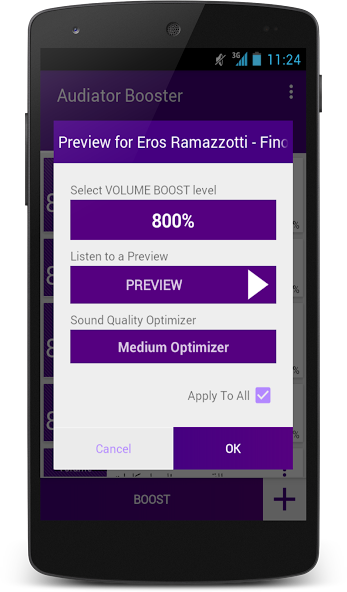
MP3 VOLUME BOOSTER GAIN LOUD AI 編集者のレビュー
MP3 Volume Booster Gain Loud is an app designed to amplify the volume of your MP3 audio files. It offers a simple interface for boosting audio levels, making it easier to enhance sound quality. While effective, users should be cautious about potential distortion at high gain levels.
包括的な分析
MP3 Volume Booster Gain Loud focuses on boosting the volume of MP3 audio files. The app provides a straightforward interface where users can select an MP3 file and adjust the gain level. While it effectively increases volume, users should exercise caution as excessive gain can lead to noticeable audio distortion. The app is easy to use, but primarily supports MP3 files, limiting its versatility for users with other audio formats. The processing time is generally quick, making it a convenient tool for volume enhancement.
主な利点
- Simple and intuitive user interface.
- Effective volume boosting capabilities.
- Quick processing of MP3 files.
改善点
- Potential for audio distortion at high gain levels.
- Limited file format support (primarily MP3).
説明 MP3 VOLUME BOOSTER GAIN LOUD
Site Editorial Commentary:Boost your mp3 music volume, bass and gain with one tap with the force of ffmpeg
MP3 VOLUME BOOSTER GAIN LOUD (formerly AUDIATOR BOOSTER) is a powerful Android application designed for comprehensive audio management and volume amplification. This tool allows you to significantly boost the volume of your audio files, supporting a wide range of formats including MP3, MP2, WMA, RA, OGG, AAC, AC3, WAV, FLAC, AIF, and OGG. Whether it's music, audiobooks, ringtones, or recordings, this app can amplify them to exceed your headphone and speaker limits, delivering a louder sound experience.With MP3 VOLUME BOOSTER GAIN LOUD, you can easily locate audio files on your device and apply amplification. Customize the output with options for frequency, bitrate, mono/stereo channels, amplification levels, and modes, ensuring optimal sound quality for your headphones and speakers. The user interface is designed with Material Design principles, offering an engaging and intuitive experience.
This application leverages the renowned FFmpeg library, a leader in multimedia processing, to provide fast and efficient volume boosting. MP3 VOLUME BOOSTER GAIN LOUD benefits from FFmpeg's capabilities, delivering superior performance and exceeding your device's default audio limits.
Usage is straightforward:
1. Import your desired audio files (music, audiobooks, ringtones, recordings) using the "+" button.
2. Adjust the volume boost settings to your preference, or use the default settings based on your headphone and speaker capabilities.
3. Tap "Boost" to amplify the audio and achieve a louder sound.
After boosting, you can listen to the amplified audio, compare it with the original, set it as a ringtone, or share it via social media and email.
Key Features:
1. Supported audio formats:
-Free version: MP3.
-Pro version: MP3, MP2, WMA, RA, OGG, AAC, AC3, WAV, FLAC, AIF, OGG.
2. Background Mode: run the app in the background for extended periods to amplify your entire music library.
3. File Explorer: Easily import audio files from your device's storage or SD card with search functionality.
4. Audio Bitrate Options: Choose from various bitrates including 8 kb/s, 64 kb/s, 128 Kb/s, 256kb/s, 320 Mb/s, and 480 Mb/s.
5. Audio Sample Rate Options: Select from sample rates such as 16 kHz, 24 kHz, 32 kHz, 22.050 kHz, 44.100 kHz, and 48 kHz.
6. Material Design UI: Enjoy a visually appealing and user-friendly interface based on Material Design guidelines.
7. Amplification Modes: Select the optimal mode based on your priorities: fast speed, optimal quality, or minimum size.
8. Audio Management: Play, share, and modify amplified audio files, and set them as ringtones.
9. Queue Management: Batch processing for efficient audio amplification.
10. ARM Device Support: Compatible with all ARM-based devices.
11. Direct Support: Contact the development team directly to report issues or suggest new features.
Discover even more features by trying the app!
WARNING: Improper usage may result in audio distortion or poor quality. The outcome depends on the original volume level and the capabilities of your hardware (speakers, headphones). Use the built-in PREVIEW function to test different boosting levels before applying them to the entire file.
For contact, more information, images, and tutorials, visit:
https://www.facebook.com/audiator
新着情報
• add the distortion filter of the iPhone version [Pro version].
• add support to armeabi-v7a, arm64-v8a, x86 and x86_64 devices.
• update to latest Android version.
• important corrections and optimizations.
• add support to 38 languages.
• update the core to the latest stable FFMPEG version.


