
Calculator - unit converter
APKをダウンロードCalculator - unit converter アプリのスクリーンショット


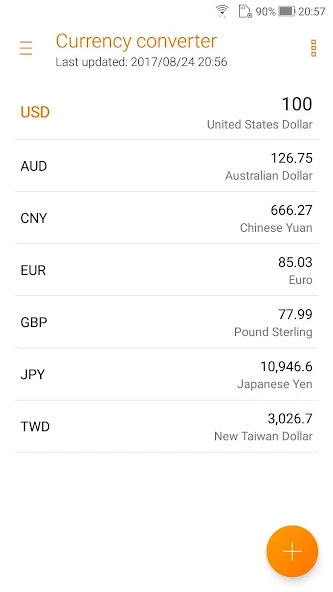
Calculator - unit converter AI 編集者のレビュー
Calculator - unit converter is a versatile tool for Android, offering both basic calculations and extensive unit conversions. Its user-friendly interface and comprehensive features make it a practical addition to any device. Simple to use, yet powerful.
包括的な分析
Calculator - unit converter provides a seamless experience for performing calculations and converting units directly on your Android device. The app features a clean and easy-to-navigate interface, making it accessible to users of all levels. Beyond basic arithmetic, it supports a vast array of unit conversions, from length and weight to currency and temperature. While generally reliable, users should always double-check complex calculations. Overall, it's a handy and efficient tool for everyday use.
主な利点
- Intuitive and user-friendly interface
- Comprehensive unit conversion capabilities
- Suitable for a wide range of Android devices
改善点
- May contain ads
- Potential for occasional calculation errors (rare)
説明 Calculator - unit converter
Site Editorial Commentary:Your most simple, handy, and stylish calculator with unit converter!
Calculator is now compatible with all Android devices running version 4.1 and above! Experience seamless calculations with Calculator - Unit Converter. This application boasts a simple, user-friendly interface, ensuring fast, smooth, and effortless calculations. It offers a comprehensive suite of features designed to cater to all your calculation requirements and preferences. Key Features: * **Unit Converter:** Effortlessly convert between various units including Length, Area, Weight, Volume, and Speed. * **Basic and Root Operators:** Perform fundamental arithmetic operations such as addition (+), subtraction (-), multiplication (×), and division (÷). * **Intuitive View Switching:** Swipe left or right to easily switch between different calculator modes. Swipe left for standard mode and right for advanced operators. * **Standard and Scientific Modes:** Tilt your device to seamlessly transition between standard and scientific calculator modes. * **Advanced Operators:** Access a wide range of operators, including percentage (%), square root (√), factorial (!), pi (π), Euler's number (e), logarithm (log), and natural logarithm (ln). * **Trigonometric Functions:** Calculate trigonometric functions in both degrees (DEG) and radians (RAD), including sine (sin), cosine (cos), and tangent (tan). * **Easy Edit Operations:** Conveniently cut, copy, and paste calculation results into any editing application. * **History Display:** Easily review your previous calculations via the comprehensive History display. * **Floating Calculator:** Utilize the Floating Calculator for quick calculations while using other applications. * **Automatic Font Size Adjustment:** The application automatically adjusts the font size to maximize the number of digits displayed. * **Thousand Separators:** Enhanced readability with thousand separators for easy number recognition. * **Combined Operator Expressions:** Allows for complex calculations using a combination of operators within a single expression. For example: √(125÷5) + sin(30x3). * **Easy Input Editing with Cursor:** Easily modify inputs using a cursor to add, delete, or change numbers and operators.新着情報
v5.0.0.27- Fixed bugsv4.0.0.52- Change the source of currency exchange rate- Fine-tune UI design- Fixed bugsv4.0.0.0- Brand new ZenUI 4.0 design- Remove classic color theme- Support theme change- Support app & pinned shortcut


