
ImageMeter
APKをダウンロードImageMeter アプリのスクリーンショット



ImageMeter AI 編集者のレビュー
ImageMeter is an Android app that allows users to measure lengths, angles, and areas directly within their photos. It's ideal for construction, real estate, and DIY projects. Accurate measurements and easy annotation make it a powerful tool for professionals and hobbyists alike.
包括的な分析
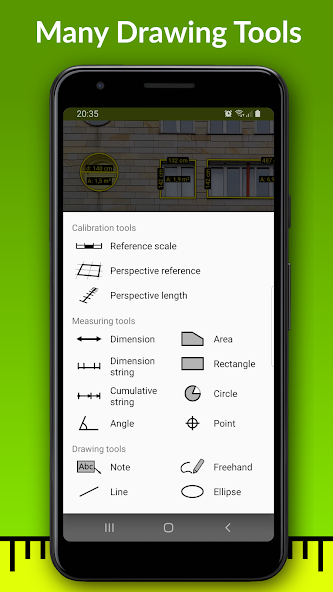
ImageMeter is an Android application designed for measuring lengths, angles, and areas directly within photos. It allows users to annotate images with these measurements, making it a valuable tool for construction workers, real estate professionals, and DIY enthusiasts. The app offers various annotation tools, and while the interface is generally user-friendly, accurate measurements rely on careful calibration. Although the free version provides basic functionality, unlocking the full potential requires a paid upgrade. Overall, ImageMeter offers a practical solution for on-site measurements and documentation.
主な利点
- Accurate measurement of lengths, angles, and areas within photos.
- User-friendly interface with easy annotation tools.
- Ideal for various applications including construction, real estate, and DIY projects.
改善点
- Requires careful calibration for precise measurements.
- Limited free version features; full functionality requires a paid upgrade.
説明 ImageMeter
Site Editorial Commentary:Annotate your images with measurements and notes. Supports your Bluetooth laser.
ImageMeter empowers you to annotate your photos with precise length measurements, angles, areas, and detailed text notes, offering a far more intuitive experience than simple sketches. Ideal for on-site construction planning, you can capture photos of buildings and seamlessly integrate required measurements and annotations directly onto the images. Efficiently organize and export your annotated images directly from your phone or tablet.ImageMeter stands out with its extensive support for Bluetooth laser distance measurement devices, compatible with a wide array of devices from various manufacturers (refer to the device list below).
A key highlight is ImageMeter's ability to perform measurements within an image once calibrated using a known reference object. This feature is invaluable for measuring hard-to-reach or otherwise inaccessible dimensions. ImageMeter intelligently manages perspective foreshortening, ensuring accurate measurements even in challenging scenarios.
Key Features (Pro version):
- Measure lengths, angles, circles, and areas of any shape using a single reference measurement.
- Seamless Bluetooth connectivity to laser distance meters for measuring lengths, areas, and angles.
- Support for both metric and imperial units (including decimal and fractional inches).
- Add comprehensive text notes to your measurements.
- Utilize freehand drawing tools and basic geometric shapes for annotations.
- Export your work in PDF, JPEG, and PNG formats.
- Adjust brightness, contrast, and saturation to enhance the readability of your annotations.
- Create sketches on blank canvases.
- model-scale mode: visualize original and scaled sizes for building models.
- Display values simultaneously in both imperial and metric units.
- Context-sensitive cursor snapping for fast and precise drawing.
- Rapid and accurate value input with intelligent autocompletion.
- Measure pole heights using two reference markings.
Advanced Annotation Add-On Features:
- Import PDF files and measure drawings at scale.
- Incorporate audio notes and picture-in-picture for detailed views.
- Create measurement strings and cumulative strings for comprehensive documentation.
- Organize your images into color-coded subfolders for efficient management.
Business Version Features:
- Automatically upload your photos to OneDrive, Google Drive, Dropbox, or Nextcloud.
- Access your photos conveniently from your desktop PC.
- Automatically back up and synchronize images across multiple devices.
- Generate detailed data tables of your measurements.
- Export data tables for use in spreadsheet programs.
- Embed data tables directly into exported PDFs.
Supported Bluetooth Laser Distance Meters:
- Leica Disto D110, D810, D510, S910, D2, X4
- Leica Disto D3a-BT, D8, A6, D330i
- Bosch PLR30c, PLR40c, PLR50c, GLM50c, GLM100c, GLM120c, GLM400c
- Stanley TLM99s, TLM99si
- Stabila LD520, LD250
- Hilti PD-I, PD-38
- CEM iLDM-150, Toolcraft LDM-70BT
- TruPulse 200 and 360
- Suaoki D5T, P7
- Mileseey P7, R2B
- eTape16
- Precaster CX100
- ADA Cosmo 120
For a complete list of supported devices, please visit: https://imagemeter.com/manual/bluetooth/devices/
Comprehensive documentation available at: https://imagemeter.com/manual/measuring/basics/
----------------------------------------------------
ImageMeter is a proud winner of the "Mopria Tap to Print contest 2017" for its innovative mobile print capabilities.
*** Featured in This Old House TOP 100 Best New Home Products: "a superpower for anyone shopping for furnishings to fit a space" ***
----------------------------------------------------
For support, please contact: [email protected].
Your feedback is invaluable! Please feel free to reach out with any problems or suggestions. I am committed to responding to your emails and providing assistance to resolve any issues.
----------------------------------------------------
I extend my sincere gratitude to all users for their invaluable feedback. Many of your suggestions have been implemented and have significantly contributed to the app's improvement. This feedback is crucial in further enhancing the software to meet your evolving needs.
新着情報
- receive angle measurements from Leica Disto X3/X4
- updated Russian translation
- bug fixes


