
FLIR ONE
Télécharger l'APKFLIR ONE Captures d'écran de l'application


FLIR ONE AI Avis de l'éditeur
The FLIR ONE app seamlessly connects to FLIR ONE thermal cameras, enabling users to visualize heat signatures. It offers efficient temperature measurement, image capture, and analysis, making it ideal for home inspection, DIY projects, and professional use. Simple to use with a user-friendly interface.
Analyse complète
The FLIR ONE app serves as the primary interface for FLIR ONE series thermal cameras. It allows users to view thermal images in real-time, capture photos and videos, and analyze temperature data. The app boasts a user-friendly design, making it accessible to both novice and experienced users. While the app itself functions smoothly, its effectiveness is directly tied to the capabilities of the connected FLIR ONE camera. It's a valuable tool for anyone needing thermal imaging capabilities on their smartphone.
Principaux avantages
- Seamless connection with FLIR ONE thermal cameras
- Intuitive interface for easy temperature measurement and analysis
- Versatile applications for home inspection, DIY, and professional tasks
Domaines d'amélioration
- Requires a separate FLIR ONE thermal camera device
- Performance relies heavily on the quality of the FLIR ONE camera model
La description de FLIR ONE
Site Editorial Commentary:FLIR ONE app with the FLIR ONE accessory turns your phone into a thermal camera.
Connect your FLIR ONE® series Thermal camera to your smartphone for efficient troubleshooting and inspection. This app transforms your device into a powerful thermal imaging tool, enabling you to see heat signatures invisible to the naked eye.note: This app requires a FLIR ONE series Thermal Camera connected to your smartphone to access the thermal camera view. However, you're welcome to explore the app's features even without the device attached. Visit www.flir.com/flirone for more information about the FLIR ONE series.
Whether you need to inspect electrical panels, pinpoint HVAC failures, or uncover hidden water damage, the FLIR ONE series offers the features you need to find problems faster and get more work done in less time. With advanced image enhancement features like FLIR MSX® (Multi-Spectral Dynamic Imaging) and FLIR VividIR™, the FLIR ONE series delivers best-in-class thermal imagery for smartphones, ensuring precise problem detection.
The revolutionary rugged and ergonomic camera design, combined with the wireless connection of the FLIR ONE Edge series, ensures efficient troubleshooting. Use the camera attached to your phone, or detach it for increased flexibility when inspecting hard-to-reach targets while comfortably viewing your screen.
Key FLIR ONE App features:
- Use the thermal camera view to scan for faults and capture photos and videos to your gallery.
- Troubleshoot efficiently with automatic tracking of the hottest and coldest spots (Edge Series and Pro Series only).
- Choose from a variety of color palettes for optimal visualization.
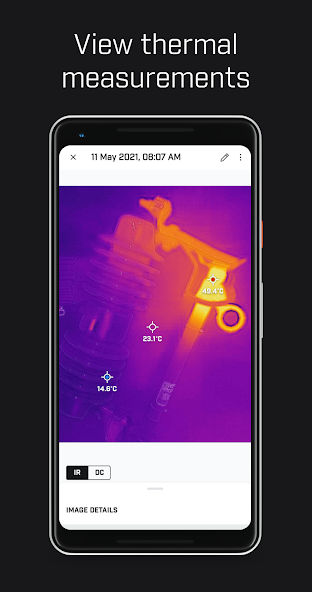
- Analyze faults with temperature spot measurements.
- Adjust the IR scale to highlight problem areas (Edge and Pro Series only).
- Switch between Quality mode for the best possible image quality and Performance Mode for a more responsive camera experience.
- Add text notes to photos to document your findings.
- Connecting to FLIR Ignite™ allows instant cloud uploading of your files, enabling access from any device. Organize files into folders, edit images, create reports, and share findings with colleagues and clients.
- FLIR ONE Inspection Guides (paid feature) empowers you to confidently identify issues with step-by-step guides and helpful tips on detecting moisture, insulation problems, and air leaks.
- Explore a wide range of FLIR ONE compatible apps tailored for specific use cases, expanding the functionality of your thermal camera.
For additional application ideas, news, and to share your discoveries, follow FLIR on social media: facebook.com/flir, instagram.com/flir, x.com/flir, and youtube.com/flir.
Terms of use: https://www.flir.com/corporate/terms-of-use/
Nouveautés
- New User Interface implemented.
- Stability improvements.
- Various bug fixes. E.g.:
Battery level displayed correctly.


