
MePlayer Movie
APK herunterladenMePlayer Movie Anwendungsbilder


MePlayer Movie AI Redakteursbewertung
MePlayer Movie enhances English learning through movie playback. Enjoy subtitles, vocabulary tools, and interactive features for an immersive language experience. Stream or download content and improve your English skills effectively with this educational entertainment app.
Umfassende Analyse
MePlayer Movie is designed to help users learn English by watching movies. It features interactive subtitles that allow you to click on words for definitions, and a built-in vocabulary tool to save and review new words. You can stream movies or download them for offline viewing. While the movie selection is somewhat limited, the app provides a unique and engaging way to improve your English skills. The user interface is functional but could benefit from improvements in intuitiveness.
Hauptvorteile
- Interactive subtitles for language learning
- Vocabulary tools to define unfamiliar words
- Offline playback support for learning on the go
Verbesserungsbereiche
- Limited movie selection compared to larger platforms
- User interface could be more intuitive
Die Beschreibung von MePlayer Movie
Site Editorial Commentary:Movie English
Learn English in an engaging way with MePlayer movie by watching movies!Experience a unique viewing mode with vertical view – watch your favorite movies and read the subtitle script simultaneously!
MePlayer Movie is a powerful movie player specifically designed for language learning, particularly English, with comprehensive support for SMI and SRT subtitles.
Study efficiently by scrolling through the entire subtitle script while enjoying your movie. Instantly look up unfamiliar words in the built-in dictionary with a simple click.
Effortlessly improve your English skills with features like automatic intelligent replay and repeat, allowing you to focus on challenging sentences.
MePlayer Movie functions as a fully featured video player, providing a seamless movie-watching experience with familiar controls.
==== Before-Playing Settings ====
To ensure optimal performance, place your movie file and its corresponding subtitle file in the same folder on your device.
The app generally supports MP4 and AVI formats. Ensure your movie is in a format compatible with your phone's native player. We recommend encoding your files to MP4 for the best experience. Subtitles should be in SMI or SRT format.
==== Directions for Use ====
1. Launch MePlayer Movie and select the desired movie from the playlist.
2. Utilize the intuitive playback controls on the movie display: Rewind, Pause/Play, and Fast Forward.
- Rewind: Returns to the beginning of the last subtitle.
- Pause/Play: Toggles the playback and displays the control menu.
- Fast Forward: Advances to the beginning of the next subtitle.
3. Scroll through the subtitle script and tap any part to start playback from that specific point.
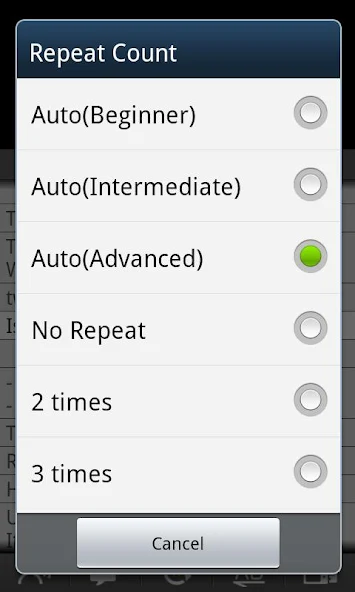
4. Customize your learning with the Replay function, which automatically repeats sentences as many times as you specify.
- Intelligent Replay: Dynamically adjusts the number of replays based on sentence complexity.
- Section Replay: Provides convenient sentence-by-sentence replay for focused practice.
5. The Repeat function automatically pauses after each sentence, allowing you to read the subtitle, practice speaking, or utilize Text-to-Speech (TTS) if enabled on your device.
6. Easily switch between Korean, English, or All subtitles using the Subtitle Selection option.
7. Toggle between Horizontal View (full-screen) and Vertical View for optimal viewing.
8. Enjoy background audio playback with the Sound Play feature. When exiting a movie (using the Back button), the audio will continue to play like an MP3 player.
9. Access the Dictionary by tapping a subtitle in the movie image or long-clicking a subtitle in the lower script. Select a word to search, and its definition will be displayed.
- Build your vocabulary list by reviewing searched words.
- Delete searched words with a long click.
- Utilize TTS pronunciation support (configure in phone settings if sound is unavailable).
10. Customize your experience in the Setting menu, including Resume Play, Dictionary Selection, Horizontal/Vertical View preferences, and more.
==== Supported Functions ====
. Seamlessly view SMI or SRT subtitles with automatic scrolling.
. Enjoy one-touch navigation: Rewind, Play/Pause, and Fast Forward by tapping the movie display.
. Convenient Subtitle Navigation
. Versatile Sentence Replay options: Sentence Replay, Intelligent Sentence Replay, Section Replay
. Repeat Functionality
. Integrated Dictionary (powered by Google Dictionary, supports multiple languages).
. TTS Pronunciation for subtitles and dictionary entries.
. Searched Word List (Vocabulary List)
. Horizontal/Vertical View modes (optimized for Vertical View learning).
. Background MP3 playback.
. Resume Playback from your last stopped point.
. Adjust Subtitle Synchronization for perfect timing.
. Listen to subtitles with TTS.
. Section Replay for selected subtitle units.
. ColorDict Support
** Important: This app does NOT include any videos. You must provide your own movie files.
Was ist neu
- add google translate
- samsung DeX support
- Audio Focus
- Dictation
- stop when headset unpluged
- You can reset study hours
- It shows your study hours with graphs
- revert AB repeat
- Playback speed


