
GPS АнтиРадар (детектор) FREE
APK herunterladenGPS АнтиРадар (детектор) FREE Anwendungsbilder


GPS АнтиРадар (детектор) FREE AI Redakteursbewertung
GPS AntiRadar FREE is a helpful app that detects speed cameras and road hazards using GPS. It provides timely alerts, contributing to safer driving, though accuracy may vary. A useful tool for cautious drivers.
Umfassende Analyse
GPS AntiRadar FREE utilizes GPS to detect speed cameras and other road hazards, providing timely alerts to the driver. The app aims to enhance driving safety by warning users of potential speed traps. While the interface is straightforward, the effectiveness hinges on frequent database updates. User experience suggests that alerts are generally accurate, but occasional false positives or missed cameras can occur. Battery consumption is a consideration due to continuous GPS usage.
Hauptvorteile
- Real-time alerts for speed cameras and hazards
- GPS-based for accurate location tracking
- Helps drivers avoid speeding tickets
Verbesserungsbereiche
- Accuracy depends on database updates
- May drain battery life due to GPS usage
Die Beschreibung von GPS АнтиРадар (детектор) FREE
Site Editorial Commentary:Warns of stationary cameras and traffic police radar on your way.
Key Features:• gps AntiRadar functions as a radar detector, providing timely alerts about stationary speed cameras and traffic enforcement radars along your route. Stay informed and drive safely!
• Powered by the up-to-date RadarBase.info database, ensuring accurate and reliable information about potential road hazards.
• The hazard database includes speed cameras, ambush locations, speed bumps, dangerous pedestrian crossings, and other objects that require driver attention. Be prepared for anything on the road.
• Enjoy a user-friendly, simple, and fully localized interface. Easy to navigate and understand.
• Seamless background operation allows you to use other apps like Yandex maps, Google Maps, navigation, or any other program while staying protected. The app will notify you of approaching cameras or hazards with a pleasant female voice.
• Comprehensive database coverage includes all regions of Russia and select CIS countries. Drive with confidence wherever you go.
• No internet connection required for operation. Simply update the database before your trip and you're good to go!
• An indispensable assistant for road trips and car travel, enhancing your Driving experience and safety.
If your speed exceeds the allowed limit by more than 19 km/h when approaching a camera, the app will issue warning sounds. This is important, as the fine for exceeding the speed limit by >20 km/h now starts at 500 rubles.
• Map with cameras in our database: https://radarbase.info
• Our Telegram channel: https://t.me/radarbase
• Our forum: https://radarbase.info/forum/sections
Here you can leave your wishes, comments, information about missing cameras, etc.
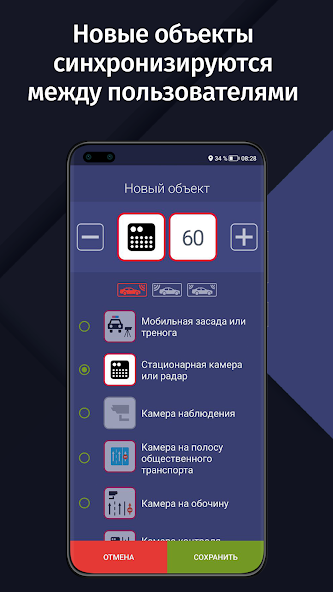
The application works using known data about the location of stationary cameras and traffic Police radars (such as Strelka or Start CT) and other objects. In the PRO version, it is possible to manually add missing cameras and synchronize them between users! You don't have to wait for us to add cameras, it is replenished simply and conveniently by the users themselves!
Attention! GPS AntiRadar is your assistant, but not a guarantee of the absence of fines, because new cameras may not immediately get into the database. Please observe traffic rules. A real radar detector, of course, works more reliably, but this application is free!
---
Frequently Asked Questions:
1. The application cannot find a GPS signal. What to do?
GPS operation depends on many factors, including weather. Many programs, such as navigation, use GSM triangulation by cell towers in addition to GPS (we do not use it due to the large error).
• Go to an open space. The GPS signal will not be found in an apartment or other enclosed space.
• Make sure the GPS module is turned on. When GPS AntiRadar is turned on, a system notification about GPS operation should appear in the Android event panel.
• Try turning the GPS module off and on again.
• Try restarting the device.
2. No sound notification. What to do?
• Make sure the volume of all types of notifications is set to maximum. You can find this setting by following this path: open the standard Android settings -> Sound -> Volume.
• Make sure that GPS AntiRadar is set to "Always warn" mode. This will allow you to play sound without violating traffic rules.
• Check the operation by driving next to the camera. As soon as the type of camera and the speed limit of this camera appear on the screen, a sound signal should sound.
• When connecting the device to the car radio using Bluetooth, make sure that other applications can play sound notifications.
3. For the application to work in the background on devices from Xiaomi, Huawei, Meizu and some other manufacturers, you need to configure the devices. See our instructions:
• Xiaomi: https://radarbase.info/forum/topic/125
• Meizu and ZTE: https://radarbase.info/forum/topic/126
• Huawei and Honor: https://radarbase.info/forum/topic/124
• OPPO: https://radarbase.info/forum/topic/123
• Samsung: https://radarbase.info/forum/topic/128
• General for all devices: https://radarbase.info/forum/topic/122
Was ist neu
Друзья, спасибо за отзывы. Работаем над проектом, вносим улучшения. По любым вопросам пишите нам: [email protected]• Небольшие улучшения в удобстве взаимодействия с фоновым окном;• Обновлены различные библиотеки под капотом приложения.Следите за нашими новостями:http://radarbase.info/news


