
Sound Profile
APK herunterladenSound Profile Anwendungsbilder


Sound Profile AI Redakteursbewertung
Sound Profile is an Android app that automates volume adjustments based on time, location, or events. Customize ringtones, notifications, and media volume for different situations, ensuring you're never disturbed or miss important alerts. It offers a user-friendly interface for easy setup and management.
Umfassende Analyse
Sound Profile simplifies volume management on Android devices. The app allows users to create profiles with specific volume settings for different scenarios, triggered by time, location, or calendar events. This automation ensures you're always using the appropriate volume level. The interface is intuitive, making profile creation and management straightforward. While the initial setup might require some effort, the convenience of automated sound adjustments makes it worthwhile. Battery consumption is a potential concern, especially with location-based triggers.
Hauptvorteile
- Automated volume control based on triggers.
- Customizable sound settings for various profiles.
- User-friendly interface for easy configuration.
Verbesserungsbereiche
- May require initial setup and configuration.
- Potential battery drain with continuous location monitoring.
Die Beschreibung von Sound Profile
Site Editorial Commentary:Control phone volume for calls, texts & notifications separately
Sound Profile empowers you to automate volume adjustments based on specific conditions such as time, location, and events. Create multiple profiles and seamlessly switch between them, ensuring your sound settings are always perfectly tailored to your current situation. Imagine a quiet profile for nighttime transitioning to a louder profile during the day, or a calls-only profile while you're at work.Sound Profile goes a step further by differentiating your call volume from your notification volume, giving you precise control over each. Set specific levels for each to avoid missing important calls or being disturbed by less critical notifications.
Effortlessly manage your device's Do Not Disturb mode with Sound Profile. Specify a list of allowed favorite contacts for each profile. In a silent profile, calls and messages from these key contacts can still reach you.
Activate profiles with a time limit, so you'll never accidentally leave your phone in silent mode. For example, enable "meeting mode" for just 30 minutes, and it will automatically revert to your default settings.
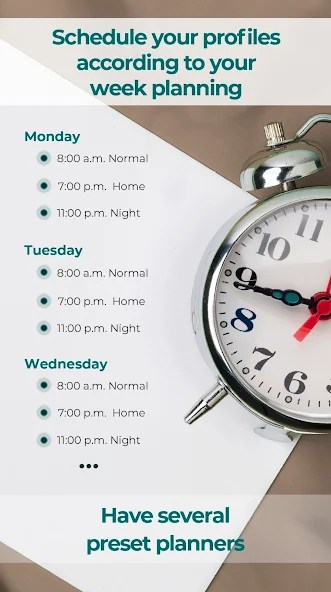
Schedule profiles to automatically activate at specific times according to your weekly routine. Set your phone to "Loud" at 6:00 AM and "Silent" at 8:00 PM without lifting a finger.
Personalize your device's appearance by assigning a unique wallpaper to each profile for easy visual differentiation.
In silent profiles, you can even allow "repeating callers" to bypass the silence. If someone calls you multiple times within a short period, their calls will ring through, ensuring you don't miss urgent matters.
Ignore spam and focus on what's important. Relax and let Sound Profile help you achieve Digital Wellbeing and Mindfulness by managing your notifications and sound levels intelligently.
⭐Tasks and Events:
-Activate the "car" profile when your car's Bluetooth connects.
-Activate the "Home" profile when your home Wi-Fi network is detected.
-Activate the "job" profile when you arrive at your workplace.
⭐Autodialing:
-Enable your voicemail in one profile and disable it in another, depending on your needs.
-Activate call forwarding automatically.
⭐Android calendar:
Activate profiles based on your Calendar events or reminders, ensuring your phone's sound settings are always appropriate for your schedule.
⭐Notification Exceptions:
Define exceptions for specific apps, allowing them to sound even in silent profiles. For example, allow "Fire alarm" or "Door alarm" messages to always come through.
⭐More features:
-Display a reminder every time you enter a specific location, helping you stay on track.
-ExeCute external apps based on conditions. For example, open Spotify automatically when headphones are connected.
-Set the screen timeout and screen brightness according to the activated profile for optimal battery life and viewing experience.
-Use different ringtones for different situations. A discreet ringtone at work and your favorite music at home.
-Customize starred contacts. Set your coworkers as starred contacts at work and your friends during the weekend.
-Lock volumes to prevent accidental adjustments by pressing the side buttons.
-Use the extended notification to quickly view the current sound profile and activate frequently used profiles.
-Utilize Google Assistant to activate profiles with your voice: "Hey Google, activate Silent for 30 minutes, then activate profile Loud".
-Integrate with automation apps like Tasker, AutomateIt, and Macrodroid to activate Sound Profile profiles from other automation workflows.
-Create shortcuts on your home screen for quick access to profiles with specific parameters.
This app is offered as a trial, and after the trial period, a low-cost subscription is required to continue using it.
For questions or suggestions, please contact me at [email protected]


