
Solid Explorer
APK herunterladenSolid Explorer Anwendungsbilder


Solid Explorer AI Redakteursbewertung
Solid Explorer is a feature-rich file manager for Android, offering dual-pane browsing, cloud storage integration, and advanced customization. It stands out with its intuitive interface and powerful tools for efficient file organization and secure data management.
Umfassende Analyse
Solid Explorer is a robust file manager designed for power users. Its dual-pane view allows for seamless file transfer and comparison. The app supports a wide range of cloud services, enabling users to manage their online storage effortlessly. Advanced features such as archive extraction (ZIP, 7Z, RAR) and network file sharing (FTP, SFTP) provide comprehensive functionality. While the interface may initially seem complex, the customization options and powerful tools make it a worthwhile choice for users seeking advanced file management capabilities.
Hauptvorteile
- Dual-pane interface for easy file management
- Extensive cloud storage support (Dropbox, Google Drive, OneDrive, etc.)
- Advanced features like archiving, FTP/SFTP client, and root access
Verbesserungsbereiche
- Trial version requires purchase for full functionality
- Interface can be overwhelming for beginners
Die Beschreibung von Solid Explorer
Site Editorial Commentary:A powerful dual-pane file manager for local, cloud & network storage.
Solid Explorer is a powerful file management application inspired by classic file commander tools. It empowers you to:* Effortlessly manage files using a convenient dual-pane layout.
* Protect sensitive files with robust AES encryption.
* Seamlessly manage files across your cloud storage services and nas devices.
* Backup applications and files to your preferred storage destinations.
**Explore Your Device's Storage**
Solid Explorer provides intuitive navigation through the files stored on your device, automatically organizing them into easily accessible collections. You can perform standard file operations like viewing, deleting, moving, renaming, and sharing. The app also features a fast, indexed search function with filters to quickly locate the files you need.
**Secure Your Sensitive Data**
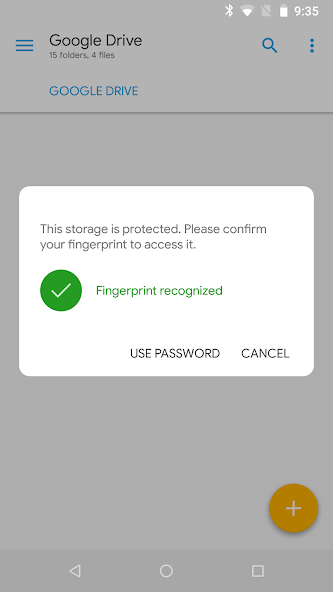
Solid Explorer offers advanced file protection through strong AES encryption. You can place encrypted files in a secure folder, rendering their contents unreadable to other applications. Access to this folder requires password or fingerprint authentication. Even after uninstalling Solid Explorer, your encrypted files remain protected on your device.
**Storage Analysis**
While Solid Explorer doesn't have a dedicated storage analyzer, it allows you to identify space-consuming files. By accessing the folder properties of your internal storage or SD card, you can view the percentage of space each folder occupies and a list of the largest files. Additionally, you can use the search function with a file size filter to find large files.
**Organize Remote Files and Cloud Storage**
Solid Explorer supports major network protocols and cloud storage providers, enabling you to manage multiple remote file locations in one centralized interface. Transferring files between cloud locations or servers is as simple as dragging them from one panel to another.
**Key Features:**
* **File Management:** Comprehensive management of files on main storage, SD card, and USB OTG drives.
* **Cloud Storage:** Easy connection and management of files on Google Drive, OneDrive, Dropbox, Box, Owncloud, SugarSync, MediaFire, Yandex, Mega (with paid add-on).
* **NAS Support:** Compatibility with major network protocols, including FTP, SFTP, SMB (Samba), and WebDav.
* **File Encryption:** Secure your files with password and fingerprint protection.
* **Archive Support:** Work with ZIP, 7ZIP, RAR, and TAR archives.
* **Root Explorer:** Access and browse system files on rooted devices.
* **Indexed Search:** Quickly locate files on your device with advanced search functionality.
* **Storage Analysis:** Identify and manage files consuming excessive storage space.
* **Organized Collections:** Files are automatically categorized into Downloads, Recent, photos, Videos, music, Documents, and Apps.
* **Built-in Viewers and Editors:** Integrated image viewer, music player, and text editor for convenient browsing on remote storages.
* **Batch Rename:** Rename multiple files at once with support for naming patterns.
* **FTP Server:** Access your local files from your PC via FTP.
* **Themes and Icon Sets:** Extensive customization options to personalize your experience.
Solid Explorer is also optimized for Chromebooks, with full support for mouse and keyboard input.
**Useful Links:**
Reddit: [https://www.reddit.com/r/NeatBytes/](https://www.reddit.com/r/NeatBytes/)
translation: [http://neatbytes.oneskyapp.com](http://neatbytes.oneskyapp.com)
Was ist neu
v3.4.10- fixed Android/data access with Shizuku- minor fixesv3.4.8/9- fixed storage usage mismatch- fixed RAR extract- minor fixesv3.4.7- improved license check- crash fixesv3.4.6- crash fixesv3.4.5- fixed inability to change home directory of FTP server- fixed broken thumbnails on network locations- archive extraction improvements- crash fixesv3.4.3/4- crash fixesv3.4.2- fixed slow 7zip extraction- fixed inability to open archives from other apps- crash fixes


