
Worker 24
APK herunterladenWorker 24 Anwendungsbilder


Worker 24 AI Redakteursbewertung
Worker 24 is a work tracker application designed to streamline schedule creation and management. It simplifies workforce organization and provides tools for efficient task allocation and time tracking, enhancing productivity and team coordination. Ideal for businesses seeking to optimize workflow.
Umfassende Analyse
Worker 24 offers a straightforward solution for managing work schedules. The application facilitates the creation of schedules and tracks employee work hours. Its intuitive interface allows for easy task assignment and monitoring. While the core function is solid, the user experience can be further improved with additional features for reporting and advanced analytics. Overall, a useful tool for businesses aiming to improve workforce management.
Hauptvorteile
- Simplifies work schedule creation and management.
- Enhances team coordination and communication.
- Provides tools for efficient task allocation and time tracking.
Verbesserungsbereiche
- May require initial setup time for optimal use.
- Functionality might be limited compared to more comprehensive project management suites.
Die Beschreibung von Worker 24
Site Editorial Commentary:Timesheet, work log, work schedule, overtime logs and leave management
Worker 24 is a comprehensive work tracker application designed to streamline employee management and optimize workforce productivity. It replaces cumbersome paper documents with modern digital solutions, making work easier and more efficient for both employers and employees.Worker 24 comprises three core modules, each designed to address specific aspects of workforce management. You can manage these modules yourself or delegate responsibilities to employees with appropriate permissions:
1. Timesheet:
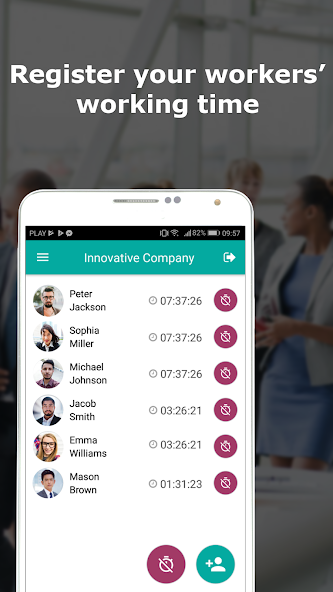
The Timesheet module enables accurate tracking of work hours for both you and your employees. It transforms smartphones or tablets into work log recorders. By leveraging NFC technology, employees can simply tap their phones at the entrance to record their start and end times. All work logs are visible in real-time, directly on your smartphone.
Worker 24 automatically generates detailed work log reports, including:
- Timesheets
- Work logs
- Overtime (both paid and unpaid)
- Unpaid breaks
- Estimated salary, including overtime pay
The Timesheet module also provides the functionality to export all work log data to an Excel file for further analysis and reporting.
2. Employee Scheduling:
Simplify work schedule creation and management with the Employee Scheduling module. It provides a clear overview of daily and monthly summaries for each worker, including:
- Number of shifts scheduled
- Number of days off
- Estimated salary for the schedule
Employees with the application can access their work schedules directly. For those without, the system can generate PDF schedules for easy distribution via email or print. Employees receive automatic system notifications when changes are made to their schedules. You can manage the employee scheduling module yourself or delegate the responsibility to another person.
3. Leave Management:
Empower employees to submit leave requests directly through the application. Authorized personnel receive instant notifications for each new request. The system facilitates clear communication by notifying employees of the decision made on their leave request. Gain a comprehensive overview of employee leave, with insights into both taken and planned leave days. Employees can view their vacation schedules within the employee scheduling module.
Worker 24 is your all-in-one solution for efficient team work, accurate time tracking, and streamlined employee management.
Was ist neu


