
Explorer
APK herunterladenExplorer Anwendungsbilder


Explorer AI Redakteursbewertung
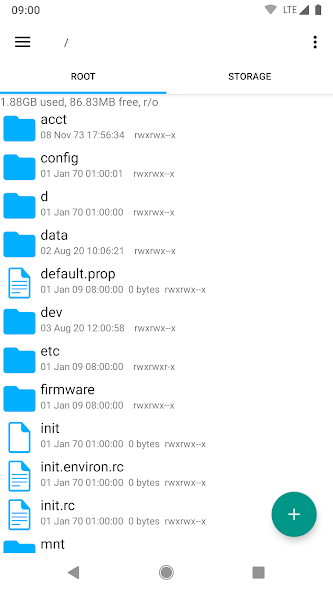
Explorer is a user-friendly file manager that excels at organizing internal storage on Android devices. It offers intuitive navigation, robust file operations, and a clean interface for efficient file management.
Umfassende Analyse
Explorer provides a seamless experience for managing files on Android devices. Its clean interface and intuitive design make it easy to navigate through folders and perform essential file operations. The app excels at organizing internal storage, allowing users to quickly locate and manage their files. While it may lack some advanced features desired by power users, Explorer offers a solid and reliable file management solution for everyday use.
Hauptvorteile
- Intuitive and easy-to-navigate interface
- Robust file management operations (copy, paste, move, rename, delete)
- Efficiently organizes internal storage
Verbesserungsbereiche
- May lack advanced features for power users
- Occasional ads (depending on the version)
Die Beschreibung von Explorer
Site Editorial Commentary:Fast, lightweight and easy to use file manager.
Explorer is a powerful and user-friendly file manager designed to effortlessly organize your internal storage and SD card content. Its clean, intuitive interface makes file management a breeze. Seamlessly access your cloud and network files for enhanced productivity.Key Features:
• Multiple Tabs: Navigate swiftly between different locations by swiping or clicking on tabs, improving your workflow.
• Cloud and Network Support: Directly access Google Drive, Box, Dropbox, and network shares (SMB) for streamlined file access.
• Customizable Themes: Personalize your experience with multiple themes, including Light, Dark, and Home Wallpaper options.
• Built-in Text Editor: Quickly view and edit text files without needing external apps.
• Archive Management: Create and extract ZIP or TAR files, and extract RAR archives with ease.
• Background Operations: Perform long-running tasks such as copying and moving files in the background without interrupting your work.
• Media Streaming: Stream video and audio files directly from network and cloud locations to your favorite media player apps.
• Home Screen Shortcuts: Create shortcuts to frequently used files and folders directly on your home screen for quick access.
• Customizable Icon Sets: Customize the look and feel with personalized icon sets.
• File Sharing: Easily send files via email, Bluetooth, and other sharing methods.
• SQLite Database Viewer: Built-in viewer for SQLite database files.
• Bookmarks: Bookmark frequently accessed files and folders for quick retrieval.
• Search Function: Quickly locate files and folders with the comprehensive search function.
• "Open With" Facility: Choose how to open files, either as a generic type or with a specific application.
• File and Folder Properties: View detailed file and folder properties, including size, date, and MD5 checksum.
For prompt and helpful support, contact us at [email protected].
Explorer supports 11 languages, including English, French, Spanish, Italian, German, Japanese, Korean, Hebrew, Danish, Russian, and Portuguese.
Permissions:
• Full Network Access: Required for accessing network and cloud storage. No personal information is transmitted over the internet.
• Add or Remove Accounts: Used by the Google Drive SDK to add new accounts if needed. No changes are made to existing accounts, and only the account name is accessed.
• Find Accounts on the Device: Used to list available accounts for logging into Google Drive.
• Prevent from sleeping: Prevents the device from sleeping during long operations to ensure they are completed without interruption.
Was ist neu
Fix for recent Dropbox issue (SDK version updated)


