
Ezhuthani - Tamil Keyboard
下载 APKEzhuthani - Tamil Keyboard 应用截图



Ezhuthani - Tamil Keyboard AI 编辑推荐
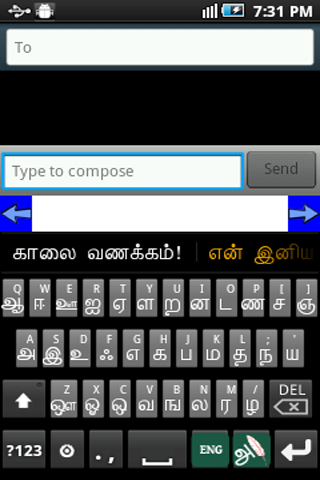
Ezhuthani - Tamil Keyboard is a user-friendly soft keyboard designed for effortless Tamil typing. It offers a simple interface and essential features for composing messages, documents, and more in Tamil. A basic, yet functional tool for Tamil language users.
综合分析
Ezhuthani - Tamil Keyboard provides a straightforward solution for typing in Tamil on Android devices. The keyboard offers a standard layout with Tamil characters, enabling users to compose messages, emails, and documents. While the interface is simple and easy to navigate, it lacks advanced features such as predictive text or customizable themes. The keyboard is generally responsive, offering a functional, albeit basic, Tamil typing experience. It is a suitable option for users seeking a no-frills Tamil keyboard.
主要优点
- Simple and easy-to-use interface
- Functional Tamil typing experience
- Lightweight and responsive
改进空间
- Limited advanced features
- Basic design and functionality
描述 Ezhuthani - Tamil Keyboard
Site Editorial Commentary:Tamil Keyboard Tamil Voice Keyboard Android Keyboard
Ezhuthani 2 - Tamil Soft keyboard is a unique and user-friendly Tamil keyboard designed for native Tamil speakers and those learning the language.Ezhuthani Version 2 features both Tamil99 and Ezhuthani keyboard layouts, providing flexibility for different typing preferences. It offers full-fledged Tamil suggestion keywords to enhance typing speed and accuracy, along with Tamil reply message templates for quick communication.
We are committed to continuous improvement and plan to add more features and keyboard layouts based on user feedback and support. This version has been tested on major Android phones and tablets (version 2.3 and above). For older devices, please use Ezhuthani 1.0.9 or earlier versions. Customize the keyboard layout to your liking and share your suggestions for improvements and new features.
How to Enable Ezhuthani (Tamil Keyboard) on your Mobile:
Android Version 2.0 and above:
Settings - Locale and Text - Select Ezhuthani (Tamil Keyboard).
Long press in a text box, select input method, and then select Ezhuthani (Tamil Keyboard).
Android Version 3.0 and above:
Settings - Language and input - Configure input methods - Enable Ezhuthani (Tamil Keyboard) - Go Back - Current input method - Select Ezhuthani (Tamil Keyboard)
Android Version 4.0 and above:
Settings - Language and input - Enable Ezhuthani(Tamil Keyboard) - Select Default - Select Ezhuthani(Tamil Keyboard)
Other Steps to ensure Ezhuthani is working correctly:
After installation, verify the installation by opening “Settings” and navigating to “Language and Keyboard.” You should see Ezhuthani Keyboard listed.
To set Ezhuthani Tamil Keyboard as your default input method, it can be used in any text box (SMS, search, etc.). Look for a keyboard icon at the top left of the title bar and click on it.
Choose "Ezhuthani Keyboard" as your input method. Your Android mobile will now use this keyboard.
You can now use Ezhuthani Tamil Keyboard controls to type in Tamil. Enjoy!
The Mary Martin Team has dedicated this product to the Tamil community as a free Android app. We hope you find it useful and enjoyable!
Mary Martin Team!
最新消息
- Samsung Android 15 & 16 Version fix- Included Tamil Calendar 2026- Improved Version- for Android 15 & 16


