
MetaMoJi Note
下载 APKMetaMoJi Note 应用截图
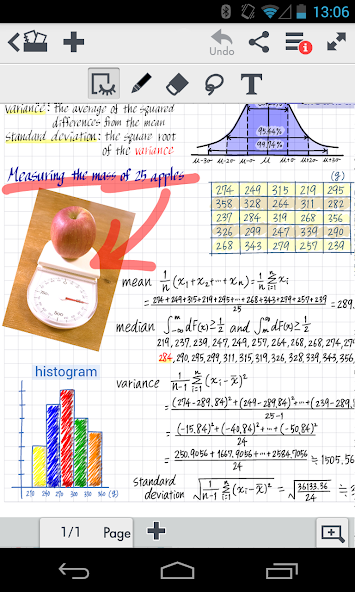


MetaMoJi Note AI 编辑推荐
MetaMoJi Note is a versatile note-taking app offering handwriting recognition, audio recording, and PDF annotation. It's ideal for students, professionals, and anyone seeking a feature-rich digital notebook. Enjoy a flexible canvas and creative tools for personalized note-taking.
综合分析
MetaMoJi Note distinguishes itself as a powerful and adaptable note-taking application. Users can effortlessly capture handwritten notes, convert them to text, and enhance them with audio recordings and multimedia elements. The app's expansive canvas allows for zooming and scaling, providing a flexible workspace. While the initial interface might seem complex, the robust feature set, including PDF annotation and drawing tools, makes it a valuable asset for both personal and professional use. However, accessing the full potential requires a subscription.
主要优点
- Excellent handwriting recognition and conversion to text.
- Versatile canvas with zooming and scaling capabilities.
- Comprehensive set of tools for drawing, sketching, and annotating PDFs.
改进空间
- The user interface can feel overwhelming for new users.
- Premium features require a paid subscription.
描述 MetaMoJi Note
Site Editorial Commentary:Award winning cross platform note taker, sketchbook and whiteboard
PLEASE note:We have identified certain issues on Android 10 and later versions:
- Object selection via tap or Lasso tool may be impaired.
- Text Unit re-editing might be problematic, potentially leading to new Text Unit insertion.
*These issues are not observed in environments up to Android 9. Operation on Android 10 or later is not guaranteed.
MetaMoJi Note is a versatile, cross-platform note-taking, digital sketchbook, and interactive whiteboard application designed for all Android-enabled devices. Seamlessly create notes, manage To-Do lists, or import and annotate PDF files directly within the app. Unleash your creativity with its high-resolution sketchbook capabilities, featuring an extensive color wheel palette with pastel shades and advanced calligraphy pens for expressive artistry.
MetaMoJi Note stands out as a highly visual and collaborative virtual whiteboard, perfect for sketching ideas, annotating documents, creating dynamic scrapbooks, or developing intricate digital mashups. Experience unparalleled flexibility and precision in your digital creations.
MetaMoJi Note distinguishes itself as the only note-taking application accessible across all major mobile platforms, ensuring seamless synchronization and accessibility. Recognized with multiple prestigious awards, including the Tabby Award for Best Personal Productivity App, a Silver Stevie® Award for International Business, finalist for the Appy Award for Productivity, and ranked as the #1 Productivity App in Japan, MetaMoJi Note is a testament to excellence in digital productivity.
Capture, share, and access your inspiration anytime, anywhere with MetaMoJi Note!
Key Features:
• Write, sketch, or Draw notes using a diverse selection of pens, paper layouts, and graphics, including exquisite calligraphy pens and specialized inks from an expansive color palette.
• Scale your documents effortlessly, transforming them from whiteboard-sized canvases to compact sticky notes, while preserving 100% visual integrity with up to 50X zoom capability and high-quality vector graphic resolution.
• Share your creations seamlessly via email or upload them directly to social media platforms like Twitter, Facebook, or Tumblr.
• Enjoy easy file storage and synchronization of files and folders to MetaMoJi Cloud, a secure cloud service that allows you to save and efficiently manage your documents (with up to 2GB of free storage).
• Save your drawings as individual JPEG graphics in the items library for convenient reuse in future projects.
• Scale, rotate, or reposition text boxes with ease, providing complete control over your workspace layout.
• Interact directly with the web within the app and annotate websites for collaborative feedback and enhanced productivity.
• Benefit from a built-in spell checker to ensure accuracy and professionalism in your written content.
Here are some ways to leverage MetaMoJi Note in your personal and professional life:
• Quickly generate notes and to-do lists for effective task management.
• Capture and annotate website pages for collaborative reviews and feedback.
• Create detailed sketches and drawings to visualize your ideas.
• Utilize it as an interactive whiteboard for brainstorming sessions and presentations during team meetings.
• Annotate photos for enhanced communication and visual storytelling.
• Review and edit documents, then share your feedback seamlessly via email.
• Outline essays, articles, or stories for structured writing and content development.
• Create your own personalized “Pinterest” board and share it across social networks.
• Engage in digital scrapbooking to preserve memories in a creative and interactive way.
• Play games directly within the app for entertainment and leisure.
• Design eye-catching flyers or personalized greeting cards.
• Draw intricate flowcharts for process visualization and problem-solving.
• Maintain a comprehensive digital calendar to stay organized and on schedule.
• Compile and organize your favorite recipes in a digital format.
• Craft personalized party invitations for special occasions.
Learn more:
More about MetaMoJi Note: http://noteanytime.com
Support: http://noteanytime.com/en/support.html
Twitter: https://twitter.com/noteanytime
Facebook: https://www.facebook.com/NoteAnytime
YouTube: http://www.youtube.com/user/NoteAnytime
USTREAM: http://www.ustream.tv/channel/note-anytime-tv
Contact us: http://noteanytime.com/en/contact.html
EULA: http://product.metamoji.com/en/anytime/android/eula/
最新消息
- Changed available Android OS version from 4.0 or later to 5.0 or later


