
My GPS Coordinates
Download ApkMy GPS Coordinates Application Screenshots


My GPS Coordinates AI Editor's Review
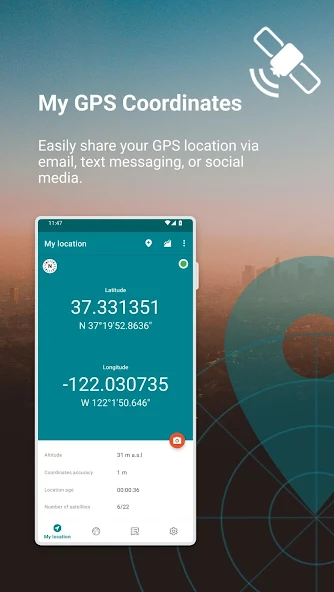
My GPS Coordinates offers a fast and simple way to obtain your current GPS location. Quickly access latitude, longitude, and accuracy data. Ideal for navigation, geotagging, and sharing your location with ease.
Comprehensive Analysis
My GPS Coordinates focuses on providing a streamlined experience for users needing quick access to their GPS location. The app efficiently determines latitude and longitude, displaying them clearly. While the interface is basic, it prioritizes speed and ease of use. It's especially helpful for tasks like geotagging photos or sharing your location with others. However, users seeking advanced features like map integration or route tracking may find it lacking.
Key Advantages
- Fast and accurate GPS coordinate retrieval
- Simple and user-friendly interface
- Easy sharing of location data
Areas for Improvement
- Limited features beyond basic coordinate display
- May require strong GPS signal for optimal performance
The description of My GPS Coordinates
Site Editorial Commentary:Share your GPS location with ease via email, text message or social media.
Get your current gps coordinates with unparalleled speed and precision!**Pinpoint Precision with High Accuracy GPS:** Discover your exact coordinates, altitude, GPS precision, and satellite count. Stay accurately oriented wherever you are with our advanced GPS technology.
**Flexible Coordinate Formats:** Tailor your experience with multiple latitude and longitude formats including DD decimal degrees, DDM degrees and decimal minutes, DMS degrees, minutes and seconds sexagesimal, UTM Universal Transverse Mercator, and MGRS Military Grid Reference System. Choose the format that best suits your needs.
**Snapshot Memories:** Capture both the moment and the location by taking a photo that artistically displays all relevant GPS details.
**Personalize Your Memories:** Customize your geo-tagged photos by adjusting the position, color, and size of the location data overlay for a unique touch.
**Bookmark Your Adventures:** Save any location and attach a photo to create lasting memories of your special spots, making it easy to revisit them later.
**Distance Units of Your Choice:** Seamlessly switch between metric and imperial units to view distances in your preferred measurement system.
**Unmatched Location Accuracy:** Rely on the app’s superior accuracy to pinpoint your exact position, ensuring you always have reliable data.
**map View of Saved Locations:** Visualize all your saved spots on an integrated, user-friendly map interface for easy navigation and overview.
**Effortless Location Search:** Easily find locations by simply entering an address – location discovery made simple and intuitive.
**Instant Location Sharing:** Share your current location quickly and effortlessly with friends, family, or emergency services.
**Organized Memories:** Filter your saved locations by date, distance, or keywords for quick and easy access to your important places.
**In-App Learning Hub:** Get the most out of the app with our helpful in-app guidance function, designed to answer your questions and provide tips.
**Compass Navigation to Saved Spots:** Let the built-in compass guide you back to your saved locations with ease and precision.
**Versatile Data Export and Import:** Use GPX, KML, or the custom MYGPS format for comprehensive data management, including photos, for seamless data backup and transfer.
**Lifesaving SOS Feature:** Send an SOS message with your current coordinates in emergency situations, customizable with a preset number and message for quick help.
**Customizable Sorting Options:** Sort your saved locations by name, date, or proximity to your current position for optimal organization.
**Adjustable Location Accuracy mode:** Fine-tune your experience by choosing your desired balance between location precision and battery consumption.
**Seamless Watch Integration:** Save locations directly from your Wear OS watch and sync seamlessly with your phone for a unified experience.
**Diverse Map Choices:** Switch between normal, terrain, hybrid, and satellite maps for diverse viewing options and enhanced geographical understanding.
Our app now features a brand new application for Wear OS devices! Effortlessly save your current location without needing your phone, and synchronize the data later to enjoy viewing your saved locations on a bigger screen.
An internet connection is not essential, but it helps to improve location accuracy.
Get your current GPS coordinates even faster!
Data is based on WGS84.
**Disclaimer:**
Location accuracy depends on the quality of the GPS hardware in your device and external weather conditions. Please note that GPS functionality may be limited indoors, so optimal performance is achieved outdoors.
What's New
Now you can export all your saved locations to KML and GPX. We also added a new format that allows you to export all data and images, so later you can import them back or send them to your friend. Added option to customize image quality. You can save space on storage, by modifying it. Fixed all bugs and minor issues.


