
알라딘 전자책 (eBook)
Download Apk알라딘 전자책 (eBook) Application Screenshots


알라딘 전자책 (eBook) AI Editor's Review
Aladdin eBook provides a vast selection of Korean eBooks with customizable reading options. Enjoy a comfortable reading experience with various features, but be aware of potential limitations in content availability and occasional performance hiccups.
Comprehensive Analysis
Aladdin eBook is a popular choice for Korean readers seeking a comprehensive digital library. It boasts an impressive array of typesetting options, allowing users to tailor the reading experience to their preferences. The app delivers stable performance for basic reading tasks and provides various features to enhance usability. While the content catalog is primarily focused on Korean eBooks, and some users have reported occasional performance glitches, Aladdin eBook remains a solid option for enjoying digital books.
Key Advantages
- Extensive library of Korean eBooks.
- Highly customizable reading experience with advanced typesetting options.
- Stable and reliable performance for core reading functions.
Areas for Improvement
- Content selection might be limited compared to global eBook platforms.
- Occasional performance issues reported by some users.
The description of 알라딘 전자책 (eBook)
Site Editorial Commentary:Aladdin has been upgraded with new features and design e-book viewer!Smart phone, read a book on your tablet free and easy!
Discover a better way to enjoy books with the Aladin eBook app, your ultimate digital reading companion!The Aladin eBook reader provides the best reading experience with the largest selection of typesetting options and reliable features. Read eBooks on various devices, including smartphones, tablets, and e-ink devices, with optimized resolution.
Enjoy the freedom to read eBooks on up to 5 devices per account. With automatic synchronization, you can seamlessly sync your bookmarks, notes, and reading progress across all your devices, anytime, anywhere.
Key Features:
1. Enhanced Functionality:
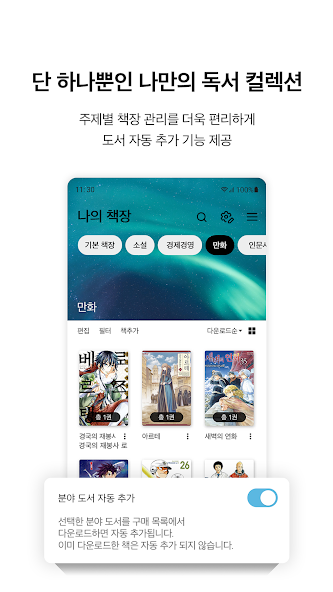
- Simplified Bookshelf: Easily manage your bookshelf with swipe gestures for list management, syncing, and moving books.
- Text-to-Speech: Utilize your device's built-in TTS engine to enjoy reading in multiple languages.
- Customizable editing: Benefit from extensive editing options, allowing you to tailor the layout to your preferences, just like a physical book.
- Enhanced Privacy: Secure your books with individual lock options and permanently delete unwanted titles.
2. Improved Features:
- Vertical Scrolling: Now supports vertical scrolling (available on Android OS 5.0 and above).
- Enhanced Image Viewing: Improved UI for viewing images within epub files.
- Pop-up Annotations: Long-press on footnote links to view pop-up annotations (for books with linked footnotes).
- Unified Brightness Control: Consistent brightness adjustment across all viewers (ePub, Comics, PDF).
- Reverse Comic Reading: Added option to read comics in reverse order.
- Bluetooth Remote Support: Turn pages using a Bluetooth remote.
- Grouped Sets: Easily view bundled set products.
- Refined Synchronization: More precise and reliable synchronization.
- Offline mode: View only downloaded books and easily manage full downloads or cancellations.
- Share Highlights and Notes: Share your favorite highlights and notes with others.
FAQ:
Q: I ordered an eBook, but it's not showing up in the viewer. What should I do?
A: Check your order status in your account on the mobile browser, Aladin shopping app, or PC (My Account > eBook Orders). If the status is "Preparing Product" instead of "Order Completed," there may have been a temporary network issue. Please report this through Aladin's customer service (1:1 consultation > eBook > Report a Problem) or call 1544-2514.
Q: The book I purchased is not appearing in my purchase list.
A: Pull down on the purchase list screen to synchronize the entire list. If it still doesn't appear, the order may not have been processed correctly. Please report this through customer service (1:1 consultation > eBook > Report a Problem) or call 1544-2514.
Q: I purchased a series of books, but they are listed separately.
A: The books may not be correctly categorized as a series. Report this to customer service, then synchronize your purchase list by pulling down on the screen.
Q: I get a 'Cannot find book file' error when trying to read a downloaded book.
A: The book file may have been deleted by an external app (especially V3). When using cleaner apps, exclude the Aladin eBook app to prevent file deletion.
[Access Permissions]
• Optional Permissions:
- Phone: Used for user authentication.
- Storage: Used for adding user books and fonts.
- Notification: Used for sending app push notifications.
(You can use the app without agreeing to optional access permissions.)


