
GPS Essentials
Download ApkGPS Essentials Application Screenshots


GPS Essentials AI Editor's Review
GPS Essentials is a comprehensive navigation tool for Android, offering waypoint management, route tracking, and various GPS-related functionalities. It's a powerful solution for outdoor enthusiasts and professionals needing precise location data and navigation capabilities.
Comprehensive Analysis
GPS Essentials provides a robust suite of tools for GPS navigation and data management. Users can navigate using waypoints, record tracks, and view detailed GPS information. The app offers a highly customizable interface, allowing users to tailor the display to their specific needs. While the app offers a wealth of features, the interface can feel overwhelming at first, and new users may experience a steep learning curve. However, the comprehensive functionality makes it a valuable tool for serious GPS users.
Key Advantages
- Extensive set of GPS tools and features
- Precise waypoint management and navigation
- Highly customizable user interface
Areas for Improvement
- Steep learning curve for new users
- Interface can feel cluttered at times
The description of GPS Essentials
Site Editorial Commentary:The Swiss army knife of GPS navigation!
gps Essentials is the most complete and versatile GPS tool available for Android, designed for navigation, waypoint management, track recording, and route planning. It empowers you to build a personalized dashboard from over 45 unique widgets, providing real-time data and essential tools for all your outdoor adventures.❧❧❧❧❧ Dashboard ❧❧❧❧❧
Customize your display with navigation values such as Accuracy, Altitude, Speed, Battery level, Bearing, Climb, Course, Date, Declination, Distance, Estimated Time of Arrival (ETA), Latitude, Longitude, Max Speed, Min Speed, Actual Speed, True Speed, Sunrise, Sunset, Moonset, Moonrise, Moon Phase, Target waypoint, Time, Time To Go (TTG), and Turn instructions.
❧❧❧❧❧ Compass ❧❧❧❧❧
Navigate with precision using the built-in compass, which displays the Earth's magnetic field orientation, an arbitrary tracking angle, and the current target. It also features a specialized marine orienteering compass for nautical navigation.
❧❧❧❧❧ Tracks ❧❧❧❧❧
Record your journeys and view them on a map. Export your tracks as KML files for seamless integration with Google Maps, Google Earth, and other mapping applications.
❧❧❧❧❧ Routes ❧❧❧❧❧
Plan and manage your routes effectively, visualizing them on a map. Import KML files from Google Maps, Google Earth, and other sources. Generate turn-by-turn navigation instructions between waypoints for effortless guidance.
❧❧❧❧❧ camera ❧❧❧❧❧
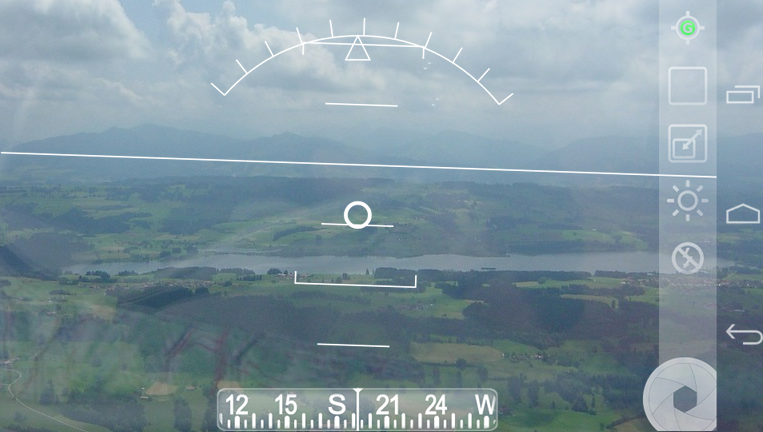
Enhance your navigation with the camera HUD (heads-up display) view, which overlays waypoint information onto your camera feed. Capture geo-tagged photos and share them with ease.
❧❧❧❧❧ Map ❧❧❧❧❧
View your waypoints on a map and convert contact addresses into waypoints for easy navigation. The app supports Google Maps, MapQuest, OpenStreetMap, and other popular mapping services.
It supports Google Maps v2, offering features like Indoor Maps, Traffic updates, Building outlines, Satellite and Terrain layers, and map rotation.
❧❧❧❧❧ Waypoints ❧❧❧❧❧
Maintain a comprehensive list of your waypoints with export and import capabilities (KML, KMZ, GPX, and LOC formats).
❧❧❧❧❧ Satellites ❧❧❧❧❧
Get a sky view of the current satellite positions, displaying the satellites in your view for optimal GPS signal acquisition.
❧❧❧❧❧ Features ❧❧❧❧❧
It supports various position formats: UTM, MGRS, OSGB, Degree-Minute-Second, Degree-Minute-Fractions, Decimal, and Mils. Supports over 230 datums.
Waypoints, routes, and tracks can be exported as KML or GPX files and shared via email or uploaded to Google Drive or Dropbox.
For more information, please visit the web page provided. Contact the developer via email for support. Please note that assistance cannot be provided through comments alone.
Support the development of GPS Essentials by purchasing the "GPS Essentials Donation Plugin" on the Google Play Store.
Join the Google Play Beta channel to access the latest beta releases, explore new features, and contribute to the improvement of GPS Essentials.
This app contains advertising. If you prefer an ad-free experience, please refrain from installing or updating.
GPS Essentials is not affiliated with any political party or other organization mentioned in the advertisements and has no connection with any economic interests. If you have concerns about the ads, please contact AdMob directly.
Permissions Explained:
✓ Coarse/Fine/Background location: Accesses network locations and GPS for accurate positioning.
✓ Full internet access: Retrieves map tiles and sends bug reports for continuous improvement.
✓ modify/delete USB storage contents: Writes waypoints, tracks, and images to the SD card for data storage.
✓ Read phone state and identity: Tags pictures with the device ID (can be disabled in settings for privacy).
✓ Take pictures and videos: Enables the Camera HUD and allows you to capture pictures.
✓ Your accounts: Required to run Google Maps v2.
What's New
Fixes crash when rotating satellite view


