
마공앱 마법천자문 공식앱
Download Apk마공앱 마법천자문 공식앱 Application Screenshots


마공앱 마법천자문 공식앱 AI Editor's Review
The official Magic Thousand-Character Classic app offers an augmented reality experience for the comic book. It enhances learning through interactive AR features, bringing the characters and stories to life. Ideal for fans of the series seeking to engage with the content in a new way.
Comprehensive Analysis
The '마공앱 마법천자문 공식앱' is an augmented reality companion app designed for the Magic Thousand-Character Classic comic book series. It utilizes AR technology to bring the characters and stories from the comic to life. Users can point their devices at specific pages to trigger interactive animations and effects. While the AR features are engaging, the app's primary function is to enhance the comic book experience, potentially limiting its appeal to those unfamiliar with the series. The app performs smoothly, provided the device meets the recommended specifications.
Key Advantages
- Interactive AR features enhance engagement with the comic book.
- Provides a new and immersive way to experience the Magic Thousand-Character Classic.
- Officially licensed app ensures accurate and authentic content.
Areas for Improvement
- AR functionality may require specific device specifications.
- Limited functionality beyond AR comic book enhancement.
The description of 마공앱 마법천자문 공식앱
Site Editorial Commentary:Magic heaven advisor official app
**마공앱 마법천자문 공식앱 (Magic Chunja Mun Official App)**This is the official augmented reality (AR) app for the Magic Chunja Mun comic book series. Enhance your learning and entertainment experience with interactive 3D Hanja magic!
**Recommended Specifications:**
- Devices: S8 or higher models are recommended for optimal AR performance.
- Due to the high processing requirements of AR features, lower-spec devices may experience difficulties.
- Even on recommended devices, insufficient storage or numerous installed apps may prevent installation.
"Magic Chunja Mun comic books, together with the Magong App!"
The Magong App (Magic Chunja Mun Official App) helps you enjoy the Magic Chunja Mun comic books in a more fun and vivid way.
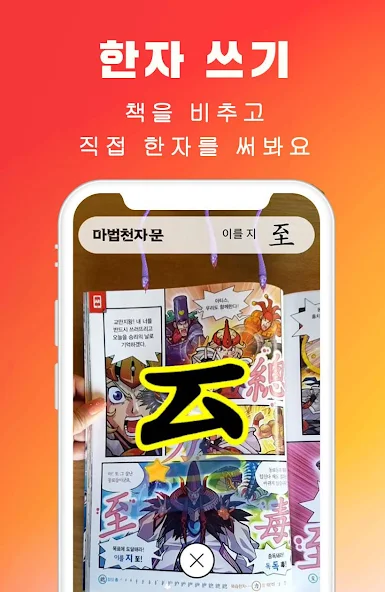
Simply point your device at the book or cards to activate 3D Hanja magic using the AR function.
From Volume 54 onwards, you can acquire cards and increase your leader rank through upgrade training that appears when you scan the book!
(Volumes 1-53 only support 3D Hanja magic.)
**[Features Added from Volume 54 Onwards]**
● **Leader Rank System**
You are now a leader! Enhance your abilities through upgrade training and demonstrate your skills in battle.
● **Upgrade Training Content**
Increase your leader rank and acquire cards through upgrade training based on vocabulary from Magic Chunja Mun!
● **Card Collection Content**
Acquire 3 character cards and 20 vocabulary cards for each volume. Collected cards can be viewed in the encyclopedia, and touching a card will play its corresponding animation.
● **Enhancement System**
Strengthen your acquired character cards into more powerful versions using magic stones.
● **Boss Battle Content**
Defeat bosses from Magic Chunja Mun with your acquired characters and earn rewards. Rewards are distributed based on contribution.
**[Pages with AR Effects]**
▶ **Magic Chunja Mun Revised Edition Volume 54 onwards**
- Book Cover
- 20 pages of the book's content
- Front of 20 Hanja cards
▶ **Magic Chunja Mun Revised Edition Volumes 1-53**
- Book Cover
- 20 pages of the book's content (look for the red 'AR mark' in the corner)
- Front of 20 Hanja cards
▶ **Magic Chunja Mun Old Edition Volumes 1-44**
- Book Cover
- 20 pages of the book's content (old editions do not have an AR mark)
▶ **Magic Chunja Mun Infant Hanja Revised Edition Volumes 1-10**
- 212 included cards
● Scan the Magic Chunja Mun comic books and cards to experience amazing Hanja magic!
- An internet connection is required for Hanja magic.
● Share photos/videos of your Hanja magic with friends, and check Magic Chunja Mun news/YouTube/webtoons in one place!
**[Frequently Asked Questions (FAQ)]**
▶ **The app doesn't recognize the book or cards.**
- If image recognition is not working, touch the yellow [+] in the center to rescan the image.
- Ensure the image is facing the camera directly and fits within the frame.
- Light reflection may interfere with image recognition, so use in a well-lit area with minimal glare.
- Not all pages are recognized. Refer to the list of pages with Hanja magic.
▶ **The app doesn't recognize the image or freezes.**
- If image recognition is not working, touch the yellow [+] in the center to rescan the image.
- The Magong App contains augmented reality (AR) features, and prolonged use may cause overheating and app overload. Close the app and restart it.
▶ **The app takes a long time to start.**
- The app requires time to prepare for Magic Chunja Mun book image recognition upon startup.
- App startup may be slow on older smartphones.
▶ **It's cumbersome to write the Hanja every time I scan a book.**
- Check 'Skip Hanja Writing After First Time' in the settings to skip writing after you've written it once.
- However, Hanja skipping does not apply to pages with more than 2 Hanja.
▶ **The animation video sometimes freezes.**
- Animation videos are streamed online, so they may freeze if the internet connection is slow.
- Use in a stable Wi-Fi environment.
▶ **The sound of the recorded video file is too low.**
- Video recording captures the sound from the smartphone's speaker. Increase the speaker volume.
▶ **Video recording stops automatically.**
- The maximum video recording time is 30 seconds. Recording will stop automatically after 30 seconds.
- The front camera (selfie) records on a per-AR model basis, so recording will stop automatically if you point the camera elsewhere and the model changes.
▶ **The photos and videos I took are not visible in my smartphone gallery.**
- Depending on the smartphone model, photos/videos may not appear in the gallery immediately (media scanning delay).
- Restarting the smartphone should resolve this issue.
▶ **Do I need to grant all permission requests when installing the app?**
- Camera, microphone, and storage access are required to use the app normally.
- App features will not function if you "Deny" permission requests.
▶ **I cannot comment on Plus Friend.**
- Plus Friend commenting is a feature available in KakaoTalk.
- Touch the 'Open in App' button or the image in the post in the upper right corner to open KakaoTalk in an external browser (Chrome, Internet Explorer, etc.) and leave a comment.
- The 'Open KakaoTalk App' button cannot be exeCuted due to security restrictions.
● For other inquiries, please contact us via the store review board or email!
- (주)디엔소프트 [[email protected]](mailto:[email protected])


