
Sidebar, Edge Screen, Shortcuts - Swiftly Switch
Download ApkSidebar, Edge Screen, Shortcuts - Swiftly Switch Application Screenshots



×
![]()
Sidebar, Edge Screen, Shortcuts - Swiftly Switch AI Editor's Review
Swiftly Switch is a productivity tool offering a customizable sidebar for quick app switching, shortcuts, and edge screen access, enhancing multitasking on Android devices.
Comprehensive Analysis
Swiftly Switch provides a convenient sidebar and edge screen for Android users to quickly access apps, shortcuts, and settings. The app offers a customizable interface, allowing users to tailor the sidebar to their specific needs. It simplifies multitasking by providing quick access to frequently used applications. While initial setup may be required to optimize the experience, Swiftly Switch offers a valuable tool for improved Android navigation and efficiency. The intuitive design makes it easy to learn and use.
Key Advantages
- Highly customizable sidebar for personalized shortcuts.
- Enables quick app switching and improved multitasking.
- Provides easy access to frequently used apps and settings.
Areas for Improvement
- May require initial setup and configuration.
- Potential for accidental triggers if sensitivity is too high.
The description of Sidebar, Edge Screen, Shortcuts - Swiftly Switch
Site Editorial Commentary:Make smartphone one-handed again
Swiftly Switch Launcher - SidebarSwiftly Switch is a revolutionary sidebar launcher that lets you effortlessly switch between recent apps, favorite apps, and access tasks with a simple swipe. This touch assistant combines the functionality of multiple apps, giving you quick access to navigation, calls, messages, and more from any application. Think of it as having three apps in one, all accessible with a single gesture!
- Experience rapid app switching with intuitive circles, grids, and folders.
- Transform finger gestures into a powerful Home screen Navigation Bar.
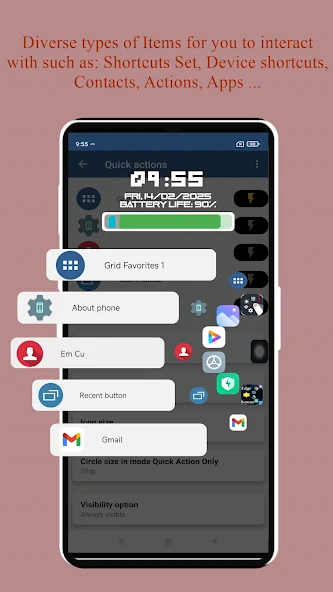
- Utilize the screen edge app with Panel view for quick access to Circle Favorites, Quick actions, Grid Favorites, music player, Calculator, and calendar edges.
Offers new ways to handle your phone:
• Recent Apps Switcher: Organize your recently used apps in a floating circle sidebar and switch between them with a single swipe from the edge screen trigger zone.
• Quick Actions: Swipe deeper from the edge panel in a rightward direction to pull down notifications, switch to the last app, go back, or open the Grid Favorites section.
• Grid Favorites: A customizable side panel where you can place your favorite apps, folders, shortcuts, and quick settings for access from any screen.
• Circle Favorites: Similar to the Recent Apps section, but dedicated to your favorite shortcuts.
Why Swiftly Switch enhances your Android experience:
• One-Handed Usability: Say goodbye to stretching your fingers! Easily reach the back button, recent apps, toggle quick settings, or pull down notifications with one hand.
• Fast Multitasking: Switch between recent apps or the last app with just a swipe. It's the fastest way to multitask on Android.
• Declutter Home Screen: Access your favorite apps and shortcuts from anywhere, keeping your home screen clean and organized.
• Focus on User Experience: Enjoy an ad-free experience with a fast, user-friendly, beautiful, and highly customizable app.
Currently supported shortcuts include apps, folders, contacts, toggle Wi-Fi, on/off Bluetooth, take screenshots, toggle autorotation, flashlight, screen brightness, volume, ringer mode, power menu, home, back, recent, pull down notification, last app, dial, call logs, and device shortcuts.
Swiftly Switch stands out as the most customizable edge app:
• Arrange shortcuts in a circle, sidebar, or floating side panel.
• Customize the position and sensitivity of the edge trigger.
• Personalize icon size, animation, background color, haptic feedback, and configure separate content for each edge, tailoring the behavior of each shortcut.
The Pro version of Swiftly Switch offers:
• Unlock a second edge for even more shortcuts.
• Customize the number of columns and rows in the Grid Favorite.
• Pin favorite shortcuts to the Recent Apps list.
• Auto-disable the app in full-screen mode.
DOWNLOAD NOW the best sidebar app, Swiftly Switch! Experience true one-handed usability, available for free with no ads.
This app uses Accessibility services.
Permissions requested by Swiftly Switch and their purpose:
• Draw over other apps: Required for displaying the floating window support for the circle, side panel, etc.
• Apps usage: Needed to retrieve recent apps.
• Accessibility: Used for performing back, power menu, and pull-down notification actions on some Samsung devices.
• Device Administration: Required for the "Screen Lock" shortcut to lock your phone (turn the screen off).
• Contact, phone: Needed for contact shortcuts.
• camera: Used for toggling the flashlight on devices running Android versions older than 6.0.
For direct communication with the developer, please use the "email us" section within the app. Your feedback, suggestions, and bug reports are greatly appreciated.
translations:
If you'd like to help localize Swiftly Switch into your language, please visit https://www.localize.im/v/xy
DOWNLOAD Swiftly Switch today and elevate your Android experience!
Sidebar, Edge Screen, Shortcuts - Swiftly Switch Appreciation Progress
1000000 / 5,000,000,000 likes
0% completed
Additional Information
Installs
Requires Android
6.0
Content Rating
12+ Everyone
Privacy Policy
View details
Available on
Google Play


