
Premama Calendar Wiz Free
Download ApkPremama Calendar Wiz Free Application Screenshots


Premama Calendar Wiz Free AI Editor's Review
Premama Calendar Wiz Free is a basic calendar app designed for pregnancy tracking. It allows users to save and organize important dates and appointments. While functional, it lacks advanced features and a modern interface. Ideal for simple scheduling needs during pregnancy.
Comprehensive Analysis
Premama Calendar Wiz Free offers a straightforward approach to pregnancy scheduling. Users can input and store crucial dates, like doctor's appointments and milestones. The app is functional for basic organization, but the interface feels dated and lacks the polish of contemporary pregnancy apps. Its simplicity can be an advantage for some, but those seeking comprehensive tracking and features might find it lacking. The app is free, making it accessible to all users.
Key Advantages
- Simple and easy to use interface.
- Allows saving and organizing important pregnancy dates.
- Free to use.
Areas for Improvement
- Lacks advanced features compared to other pregnancy apps.
- Outdated user interface.
The description of Premama Calendar Wiz Free
Site Editorial Commentary:Can save daily pregnancy records!
Premama calendar Wiz Free is a comprehensive application designed to help you meticulously document your pregnancy journey. Save daily pregnancy records with ease and keep track of important milestones.**Key Features:**
* **Simple Checkup Records:** Easily save and manage your checkup records, ensuring you never miss an important appointment or detail.
* **Pregnancy photo Album:** Capture and cherish memories by creating a visual album of your pregnancy, including ultrasound photos of your unborn baby.
* **Event and Plan Management:** Effortlessly save daily events, plans, and repeated schedules. Customize event categories and subcategories with personalized icons displayed directly on the calendar.
**Premama Calendar Wiz Manual:**
* **Initial Window:** The first launch directs you to Base Settings. Subsequent launches open directly to the calendar.
* **Creating Your Pregnancy Calendar:**
1. Select a method from the Base Settings.
2. Tap "Next."
3. Enter the required information and tap "OK."
4. Proceed to Personal Data.
* **Personal Data:**
1. Enter your personal information. The baby's name will be displayed on the calendar's title bar.
2. Tap "OK" to save.
3. Navigate to the calendar.
* **editing Base Settings and Personal Data:**
1. Tap the "Menu" button on your mobile device.
2. Select "Base Setting" or "Personal Data" to make changes.
**Calendar's Description:**
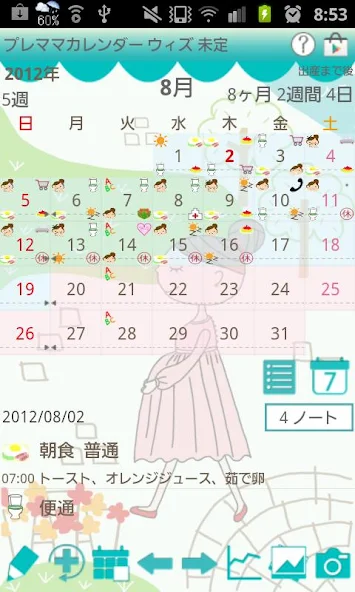
1. Baby's name is displayed on the title bar if saved in Personal Data.
2. Blue triangle marks indicate the last period's start and end dates, if saved in Personal Data.
3. The "?" mark links to the Premama Calendar Wiz page on GalleryApp's website for help.
4. The Market button introduces other applications from the developer.
5. The calendar's background color alternates between pink and blue monthly.
6. The week number indicates the current week of pregnancy.
7. Dark pink background highlights today's date.
8. The List button displays event lists.
9. The Weekly Display button switches the calendar to a weekly view.
10. The note button shows the number of saved notes.
11. The Days shown at the bottom display the remaining days until the estimated delivery date.
**Calendar Buttons (from left to right):**
1. **Event:** Save daily events.
2. **Repeat:** Save repeated events (plans).
3. **Today:** Return to today's date.
4. **Right/Left:** Navigate between dates.
5. **graph:** View graphs of blood pressure, weight, and body fat, along with a list of checkup records.
6. **Photo List:** View saved photos.
7. **camera:** Take new photos.
**Daily To-Do:**
1. Tap "Tap here to create event lists" or the Event button on the calendar.
2. Access Daily To-Do.
3. Save weight, blood pressure, and body fat measurements.
4. Add new event icons using the gray plus button.
* **Add EventIcon Window Buttons:**
* **Add:** Add and save a new event icon.
* **Back:** Return to Daily To-Do.
* **Delete:** Delete the event icon.
5. Save daily events by tapping an event icon.
6. Enter a memo and select a subcategory, then save.
7. Edit event categories by long-pressing each event icon.
**Hospital Icon on Daily To-Do:**
Tapping the hospital icon leads to the Checkup Log, where you can save checkup records.
* **Checkup Log:**
1. Select a day for "Date of next checkup" to display a hospital mark on the calendar.
2. Tick "Checkup" to indicate a completed checkup with a green checkmark on the calendar.
3. Tap the "Back" button to save automatically.
* **Accessing the Checkup Records List:**
1. From the Calendar, tap the Graph button (third from the right).
2. Tap "Checkup" from the list.
What's New
Support Android10


