
Json Genie FREE
Download ApkJson Genie FREE Application Screenshots


Json Genie FREE AI Editor's Review
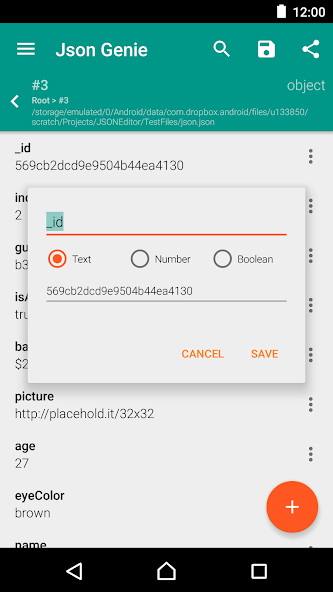
Json Genie FREE is a simple JSON editor designed for developers. It offers basic editing functionality and a user-friendly interface for viewing and modifying JSON data on Android devices. Ideal for quick edits and testing.
Comprehensive Analysis
Json Genie FREE provides a basic JSON editing experience directly on your Android device. It allows users to view, modify, and format JSON data with ease. The interface is straightforward, making it accessible even for users new to JSON. While it lacks the advanced features of desktop-based editors, it's a convenient tool for quick edits and on-the-go debugging. Performance may be affected when handling extremely large JSON files, but it's generally responsive for typical use cases.
Key Advantages
- User-friendly interface
- Simple editing functionality
- Lightweight and fast
Areas for Improvement
- Limited features compared to desktop editors
- May struggle with very large JSON files
The description of Json Genie FREE
Site Editorial Commentary:JSON file opener, viewer & editor with tree view, search, format & JSONC support
Json Genie FREE is a powerful and efficient JSON editor meticulously crafted to meet the demands of developers. It provides a seamless experience for managing JSON files directly on your Android device.**Blazing Fast Performance**
Experience unparalleled speed with Json Genie FREE. Optimized for rapid performance, it can open a 2 MB JSON file in under a second. Even large files exceeding 50 MB are handled with ease, ensuring a smooth and responsive editing experience.
**Comprehensive Editing Capabilities**
Take full control of your JSON data. Json Genie FREE empowers you to effortlessly view, edit, add, clone, and remove objects, arrays, and values within your JSON files. modify existing data, create new structures, or duplicate elements with ease.
**Versatile File Handling**
Open JSON files from a variety of sources. Leveraging Android's standard file opening mechanism, Json Genie FREE supports opening files from Dropbox, Google Drive, SD cards, and other available sources on your device. You can also create or open JSON from raw text input or directly from a URL.
**Share and Save**
Easily share and save your modified JSON files.
**Intelligent Filtering**
Quickly locate specific elements within your JSON structure using the powerful and intuitive filter option. This feature simplifies navigation and streamlines the editing process.
**Default JSON Handler**
Set Json Genie FREE as your default JSON handler to seamlessly open JSON files from other applications. Enjoy a consistent and integrated JSON editing experience across your device.
What's New
Bug fixes


