
To Do List with Reminder
Download ApkTo Do List with Reminder Application Screenshots


To Do List with Reminder AI Editor's Review
To Do List with Reminder is a simple app for managing daily tasks and schedules. It helps users stay organized with customizable reminders and easy-to-use interface. Plan your day effectively and never miss an important deadline.
Comprehensive Analysis
To Do List with Reminder offers a straightforward solution for managing daily tasks. The app allows users to create task lists, set deadlines, and receive reminders. Its simplicity makes it easy to use, but it may lack advanced features for users with complex project management needs. The customizable reminders are a key strength, helping users stay on track. Overall, it provides a functional and user-friendly experience for basic task management.
Key Advantages
- Simple and intuitive user interface
- Customizable reminders for important tasks
- Effective task management for daily routines
Areas for Improvement
- Limited advanced features for complex projects
- Potential for notification fatigue if not managed well
The description of To Do List with Reminder
Site Editorial Commentary:Daily tasks planner and routines scheduler, including todo list and reminder.
Organize your life with "To Do List with reminder," the ultimate app for managing routines, planning schedules, and organizing daily tasks in a clear and easy way.Boost your productivity and stay on top of your activities with this powerful task management tool. Easily track both completed and pending tasks, ensuring nothing slips through the cracks.
Never miss an important deadline or appointment! Set single or repeated alarms with custom ringtones and snooze options for each to-do item.
Visualize your schedule at a glance. The app categorizes tasks by time (overdue, today, tomorrow, later, no time) and highlights each period with a distinct color. Filter tasks based on their time period for focused management.
Completed tasks are clearly marked with specific colors and text styles for easy identification.
Group tasks into color-coded lists for enhanced organization. Archive lists by disabling them, keeping your active workspace clean.
Seamlessly synchronize your tasks with Google Tasks, ensuring your data is backed up and accessible across devices.
Key Features:
* Flexible Task Creation:
* Add tasks as simple notes without dates or times.
* Set tasks with dates only.
* Schedule tasks with specific dates and times.
* Enable or disable alarms for individual tasks.
* Customizable Alarm Settings:
* Enable alarms even in silent mode.
* Activate vibration for alarms.
* Adjust alarm sound level and duration.
* Personalized Task Alarms:
* Enable full-screen alarms.
* Customize snooze intervals and counts.
* Choose custom ringtones for individual tasks.
* Recurring Task Options:
* Set alarms to repeat on specific weekdays.
* Configure periodic repeats at intervals of years, months, weeks, days, hours, or minutes.
* List Management:
* Create lists to categorize different types of tasks.
* Assign unique colors to lists for easy recognition.
* Clone, edit, drop, or share lists.
* Disable lists to archive them.
* Efficient Task Management:
* Add tasks using voice input.
* Enable the quick task bar for rapid entry.
* Add multiple tasks at once, saving each line as a separate item.
* Long-click to select multiple tasks for batch actions:
* Move selected tasks to a new or existing list.
* Share, finish, or drop multiple tasks simultaneously.
* Delete all tasks in a selected list and time period with a single click.
* Intuitive navigation:
* Filter tasks by list, period, or status.
* View all tasks in a single list mode.
* Progress Tracking:
* Enable the status bar to monitor the count of today's and overdue tasks.
* Search and Sort:
* Search for specific tasks or lists.
* Sort lists and tasks by time, alphabetically, creation time, modification time, or color.
* Drag and drop lists to arrange them in a custom order.
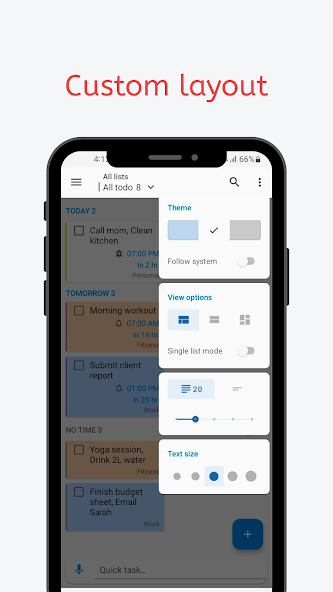
* App Customization:
* Choose from blue, white, or dark (night mode) themes.
* Set the number of displayed lines for tasks.
* Adjust the task text size.
* Set the default app language to English or your phone's default language.
* View Options:
* Browse lists and tasks in list or grid view.
* Navigate lists as vertical tabs or in a list format.
* Home Screen Widget:
* Add the app widget to your phone's home screen.
* Configure the widget to display specific lists or tasks from overdue, today, tomorrow, later, or all periods.
* Group tasks under period titles.
* Customize the widget's color, transparency, corner radius, and text size.
What's New
Minor bug fixes and performance improvements.


