
乐秀录屏大师
Download Apk乐秀录屏大师 Application Screenshots



乐秀录屏大师 AI Editor's Review
V Recorder (乐秀录屏大师) is a reliable Android screen recorder, perfect for capturing gameplay, tutorials, and video calls. It offers stable performance, customizable settings, and easy sharing options, making it a top choice for mobile screen recording. Record your screen with ease and share with friends!
Comprehensive Analysis
V Recorder (乐秀录屏大师) provides a user-friendly solution for Android screen recording. It allows users to record their screen with customizable settings, including resolution, frame rate, and bitrate, ensuring high-quality recordings. The app is particularly useful for recording gameplay, creating tutorials, and capturing video calls. While the basic version is functional, some advanced features might require a subscription. The interface is intuitive, making it easy for beginners to start recording quickly. Overall, it's a solid choice for Android screen recording.
Key Advantages
- Stable and high-quality screen recording
- Customizable recording settings (resolution, frame rate, bitrate)
- Easy to use interface and intuitive controls
Areas for Improvement
- May contain ads (depending on the version)
- Advanced features might require a subscription
The description of 乐秀录屏大师
Site Editorial Commentary:V Recorder: Record game with sound, capture recorder, edit screenshot with music
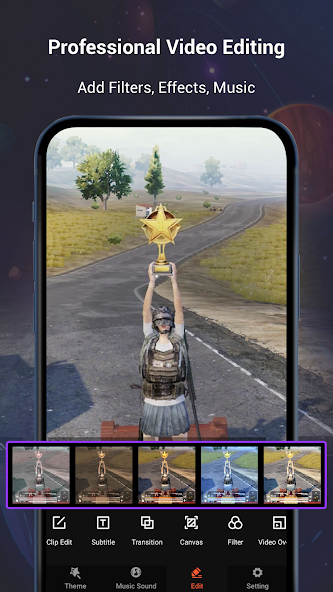
V Recorder is a robust and user-friendly screen recorder, game recorder, and video saver designed for Android devices. It functions as a comprehensive all-in-one video editor and photo editor, empowering you to create high-quality content directly from your mobile device. With V Recorder, you can seamlessly record gameplay while playing, capture your screen with a single tap, and enhance your videos with a wide array of filters, effects, and music. Our primary goal is to provide users with exceptional video quality and crystal-clear screenshots without requiring root access or imposing recording time limits. An innovative feature allows you to Draw directly on the screen during recording, and you can effortlessly record your phone screen with internal or external sound. Key Features: - Hideable Recording Window: Easily hide the recording window for a frameless video experience while recording or capturing your screen. Customize the aspect ratio to widescreen, vertical, or square to suit your needs. - Internal Audio Recording: This screen recorder supports recording internal audio, allowing you to capture in-app sounds and music directly. - Facecam Recorder: Enable the camera to capture your reactions and expressions while recording, adding a personal touch to your videos. - Smart AI Assistant: Leverage AI-powered image analysis to summarize content, extract text, and get instant answers from your screenshots. - AI Noise Reduction: Reduce distracting background noise with AI technology, isolating and enhancing human voices for clearer audio with a single tap. - Custom Floating Window: Personalize your recording experience by replacing the default floating button with your preferred feature. - GIF Recorder: Create and edit animated GIFs with ease. Tap to record GIFs or convert videos into GIFs using the user-friendly GIF editor. - Stable HD Video Recording: Record HD videos and tutorials with a stable and reliable screen recorder. Capture every detail with clarity. - One-Touch Recording: Start recording your phone screen with sound with just one tap. Pause and resume at any time for maximum flexibility. - User-Friendly Interface: Enjoy a simple and intuitive interface that makes it easy to record games, video calls, live shows, and capture screenshots. Edit images directly within the app. - High-Quality Customization: This video capture tool offers high-quality output and customizable settings. Support for HD video and both portrait and landscape video orientation allows you to tailor the recording to your specific requirements. Professional Video & Photo editing: - Trendy Filters: Choose from a selection of popular filters to give your videos a unique and stylish look. - Cute Stickers: Add fun and engaging stickers and GIFs to your videos with the integrated GIF maker. - Trendy Themes: Select from a variety of themes to match any occasion and create visually appealing content. - Fully Licensed Music: Download music online or add local songs from your device. Use voice-over, record your own voice, and add sound effects to enhance your videos. - Powerful Video Editor: Reverse, rotate, trim, and compress your recorded videos without sacrificing quality. Speed up or slow down clips with ease. - Speed Control: Easily adjust the playback speed of your videos to create dynamic effects. - Text Editing: Add custom fonts to your screenshots to highlight important information or add creative captions. - Rotate and Crop: Rotate screenshots to achieve the perfect angle and crop photos to fit social media aspect ratios. - Magic Brush: Draw, doodle, and add mosaic effects directly on the screen to create original and personalized videos. Blur images to conceal sensitive information. Effortless Sharing: - Record your phone screen in HD or fast mode without any time limits. - Automatically record audio from the microphone to create personalized videos with ease. - Record tutorials and other content without watermarks. V Recorder with audio and editor is a well-designed and functional app that captures all your precious moments, screenshots, and edited images with your smartphone. Disclaimer: 1. This application is not affiliated with YouTube. It is a recording tool. Please adhere to YouTube's platform terms when using this application to record content. 2. We respect copyright laws. Ensure you have obtained permission or authorization from the content owners before using this application for recording. 3. This application is intended for personal study and research purposes only. The recorded content should remain within the scope of personal use.What's New
Hello everyone! This update includes:- Optimized UI for a more beautiful and convenient user experience!For any questions or suggestions, please contact us through "Settings -> Help & Feedback" within the app.


